Accessible Motion: Designing for prefers-reduced-motion Without Losing Meaning
How to design motion that respects reduced-motion settings and vestibular disorders: what WCAG requires, what to remove, what to keep, and how to test.
Core Takeaway
When a user turns on reduced motion, keep the meaning of every animation but remove the movement: replace slides, zooms and parallax with short fades or instant changes, stop auto-playing loops, and never rely on motion alone to communicate something. On the web, detect the setting with the prefers-reduced-motion media query.
Why it matters
For some people, motion on screen is not a matter of taste. The W3C notes that animation can trigger vestibular disorders, with reactions that include nausea, migraine and, in severe cases, needing bed rest to recover. Operating systems let people ask for less motion, and on the web that request is exposed as the prefers-reduced-motion media query. Its value is reduce when the user has turned the setting on.
What WCAG asks for
Two WCAG success criteria cover motion. 2.2.2 Pause, Stop, Hide applies to motion that starts automatically, such as carousels and looping animation, and requires a way to pause, stop or hide it. 2.3.3 Animation from Interactions (level AAA) applies to motion triggered by user interaction, and suggests avoiding unnecessary animation, offering a control to turn it off, or using the operating system's reduce-motion setting. Even where AAA is not required, following it is good practice.
Remove movement, keep meaning
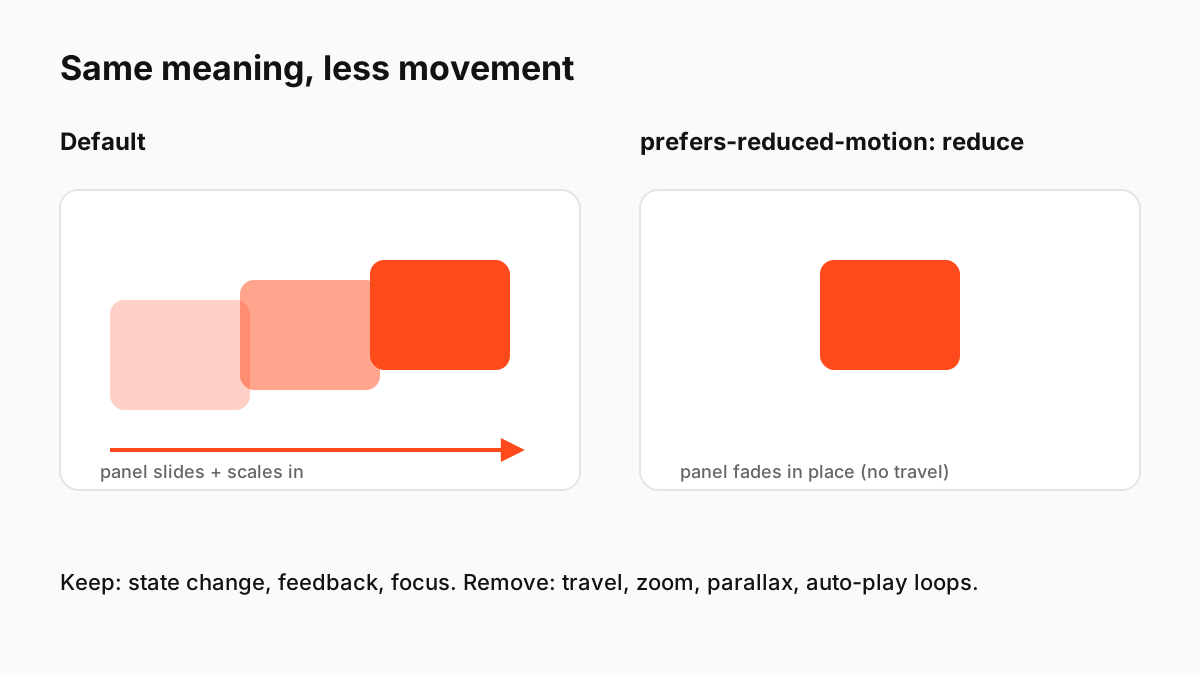
Reduced motion does not mean no feedback. A user who presses a button still needs to know it worked. The goal is to keep the state change and drop the travel.
- Remove or reduce: large slides, zooms, parallax, scroll-linked movement, spinning, auto-playing loops and background video.
- Keep: colour and opacity changes, focus indicators, short state transitions, progress information.
- Replace: page and panel transitions with a short cross-fade or an instant change.
- Never: use motion as the only way to show an error, a change or a new item.
Implementing it
On the web, wrap non-essential motion in @media (prefers-reduced-motion: no-preference), or override it inside @media (prefers-reduced-motion: reduce). In JavaScript, read window.matchMedia('(prefers-reduced-motion: reduce)') and listen for changes. Native platforms expose the same setting: SwiftUI, UIKit and Android all let you check it. If your design system has motion tokens, define a reduced variant for each one so every component behaves the same way.
Testing
Turn on reduced motion in your operating system and walk through every key flow. Check that nothing important is lost, that no loops start automatically, and that scrolling does not move content beyond what the scroll itself does. Browser developer tools can also emulate the setting.
Production Implementation Snippet
/* Default: motion only for people who have not asked for less */
@media (prefers-reduced-motion: no-preference) {
  .panel { transition: transform 280ms cubic-bezier(.2,.8,.2,1), opacity 200ms; }
  .panel[data-state="closed"] { transform: translateY(24px); opacity: 0; }
}

/* Reduced motion: keep the state change, drop the travel */
@media (prefers-reduced-motion: reduce) {
  .panel { transition: opacity 150ms linear; }
  .panel[data-state="closed"] { opacity: 0; }
}

/* JavaScript: read the setting and react to changes */
const query = window.matchMedia('(prefers-reduced-motion: reduce)');
let reduceMotion = query.matches;
query.addEventListener('change', (e) => { reduceMotion = e.matches; });
Key Principles to Remember
- Motion can make some people physically ill; respect the setting
- Remove travel, zoom, parallax and auto-play; keep state changes and feedback
- WCAG 2.2.2 covers automatic motion; 2.3.3 covers motion from interaction
- Detect the setting with prefers-reduced-motion and on each native platform
- Design a reduced variant for each motion token
Frequently Asked Questions
Sources
- Understanding SC 2.3.3: Animation from Interactions — W3C WAI
- Understanding SC 2.2.2: Pause, Stop, Hide — W3C WAI
- prefers-reduced-motion — MDN Web Docs
- Motion — Apple Human Interface Guidelines