Figma Auto Layout vs CSS Flexbox and Grid: Closing the Design-to-Code Gap
How Figma auto layout maps to CSS flexbox and grid (direction, gap, padding, hug, fill, wrap) and where they differ, so designs survive handoff.
Core Takeaway
Figma's auto layout behaves much like CSS flexbox: direction maps to flex-direction, gap to gap, padding to padding, "Hug contents" to sizing by content, "Fill container" to flex-grow or full width, and wrap to flex-wrap. Auto layout's grid flow corresponds to CSS grid. Differences appear with min and max sizes, text wrapping, baseline alignment and responsive breakpoints, so check those explicitly at handoff.
The mapping
Figma's guide describes auto layout frames that arrange children by direction, spacing, padding and alignment, with horizontal, vertical and grid flows and an optional wrap. Each has a close CSS equivalent:
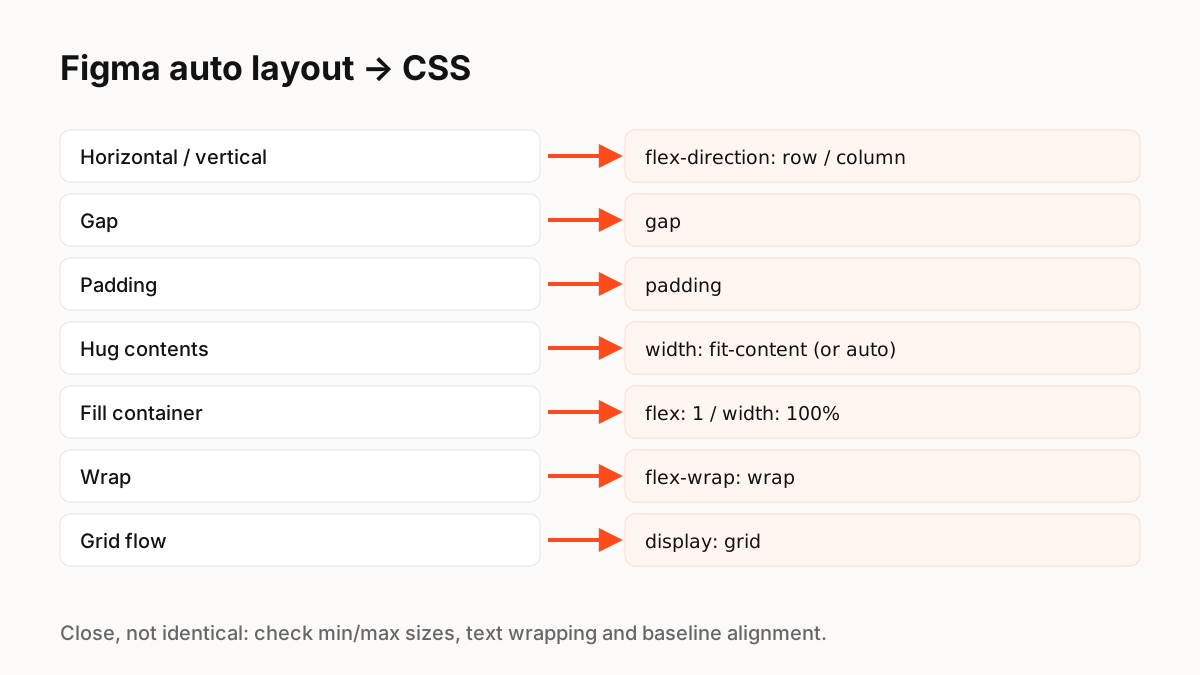
Hug, fill and fixed
In Figma, a frame set to hug contents resizes based on its children, and a child set to fill container stretches to fill available space; Figma notes that if a child is set to fill, the parent can no longer hug in that direction. In CSS the equivalents are content-based sizing (auto or fit-content) and flex: 1 or width: 100%. MDN's flexbox guide explains how flex-grow, flex-shrink and flex-basis distribute space, which is the CSS side of the same idea.
Where the gap appears
Most handoff bugs come from a few areas:
- Min and max sizes: set them in both places, or text and containers behave differently at extremes.
- Text: line height, wrapping and truncation differ between Figma text rendering and the browser.
- Baseline alignment: CSS can align by text baseline; check how this was intended.
- Absolute children: Figma's "Ignore auto layout" (formerly absolute position) maps to position: absolute in a positioned parent.
- Responsiveness: auto layout frames do not have breakpoints; define how layouts change at each width.
Grids
Use auto layout's grid flow for true two-dimensional layouts, and map it to CSS grid, which MDN describes as a system for laying out content in rows and columns. Wrapped flex rows are not the same as a grid: items in a wrapped row do not line up in columns.
Motion is the bigger gap
Layout maps reasonably well from Figma to CSS. Motion does not: prototype transitions have to be rebuilt in code, and states often get lost. That is the gap tools with runtimes, such as ExodeUI (we make it) and Rive, address for interactive components.
Key Principles to Remember
- Auto layout direction, gap, padding and wrap map to flexbox
- Hug ≈ content sizing; Fill ≈ flex: 1 or 100% width
- Grid flow maps to CSS grid
- Check min/max sizes, text, baselines and breakpoints at handoff
- Motion and states are the larger design-to-code gap
Frequently Asked Questions
Sources
- Guide to auto layout — Figma Help Center
- Basic concepts of flexbox — MDN Web Docs
- Basic concepts of grid layout — MDN Web Docs