Principle Alternatives for Windows and Linux Users in 2026
Principle only runs on the Mac. These are the realistic alternatives for designers on Windows and Linux, from browser prototyping to interactive runtimes.
Core Takeaway
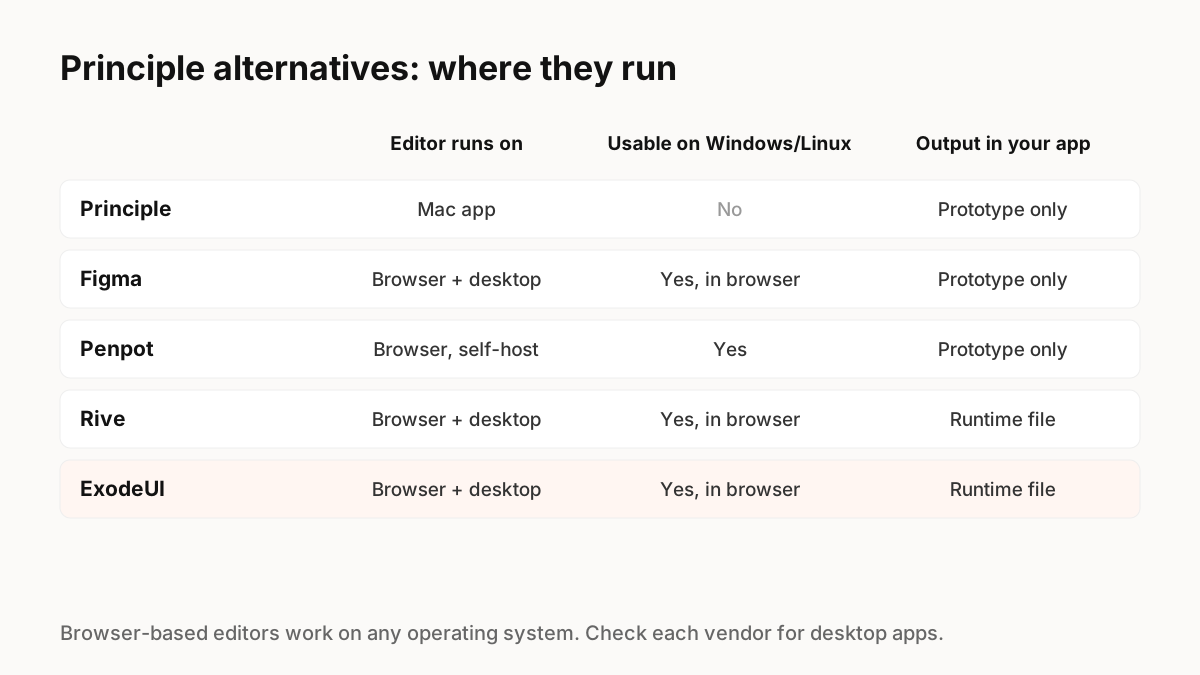
Principle is a Mac app, so Windows and Linux users need something else. For timeline-style prototypes, Figma's prototyping and Penpot both run in the browser on any system. For motion that has to ship inside a real app, browser-based tools with runtimes, such as Rive and ExodeUI, replace the prototype with a file your developers can use.
Why people look for a Principle alternative
Principle made it fast to design animated, interactive prototypes, and it can share designs to the web so anyone can view them in a browser on Windows, Linux, macOS, Android or iOS. But the editor itself is a Mac app, as the name of its site, principleformac.com, suggests. Teams with Windows or Linux designers, or teams that want the animation to ship in the product rather than stay a prototype, need something different.
The alternatives, by what you need
Pick based on the output you need, not the tool you are replacing.
- Figma prototyping: the default for clickable, animated prototypes; runs in the browser. Prototypes are references, not production animation.
- Penpot: open source, browser-based or self-hosted, with prototyping; a good fit for Linux-first teams.
- ProtoPie: strong for very realistic prototypes with sensors and logic; check its download page for platform support.
- Rive: interactive vector animation with state machines and runtimes that play the file in your app.
- ExodeUI (we make it): interactive UI with states, spring physics and logic in one open file, played by runtimes for React, Vue, Svelte, Angular, Solid, React Native, SwiftUI and Flutter.
Prototype or production?
Principle's output is a prototype: a way to show how something should feel. Developers then rebuild it. That is fine for exploring ideas. If the same component will be rebuilt every time the design changes, a tool whose file runs in the product removes that step. It is the main reason teams moving off Principle look at runtime-based tools rather than another prototyping app.
Moving existing work
There is no direct import from Principle files into the alternatives above, so plan to rebuild your key interactions. Start with the two or three components your team animates most, such as buttons, toggles and sheets, and build those first in the new tool.
Key Principles to Remember
- Principle's editor is Mac-only; shared designs can be viewed anywhere
- Figma and Penpot cover browser-based prototyping on any system
- Rive and ExodeUI produce files that run in your app, not just prototypes
- There is no direct Principle import; rebuild your most-used interactions first
- Choose by output: prototype or production
Frequently Asked Questions
Sources
- Principle — principleformac.com
- Penpot pricing and features — Penpot
- State Machine Playback — Rive docs