Controlling ExodeUI State Machine Inputs from React State
A practical guide to playing an ExodeUI file in React with the exodeui package: setting boolean, number and trigger inputs from React state, and handling events.
Core Takeaway
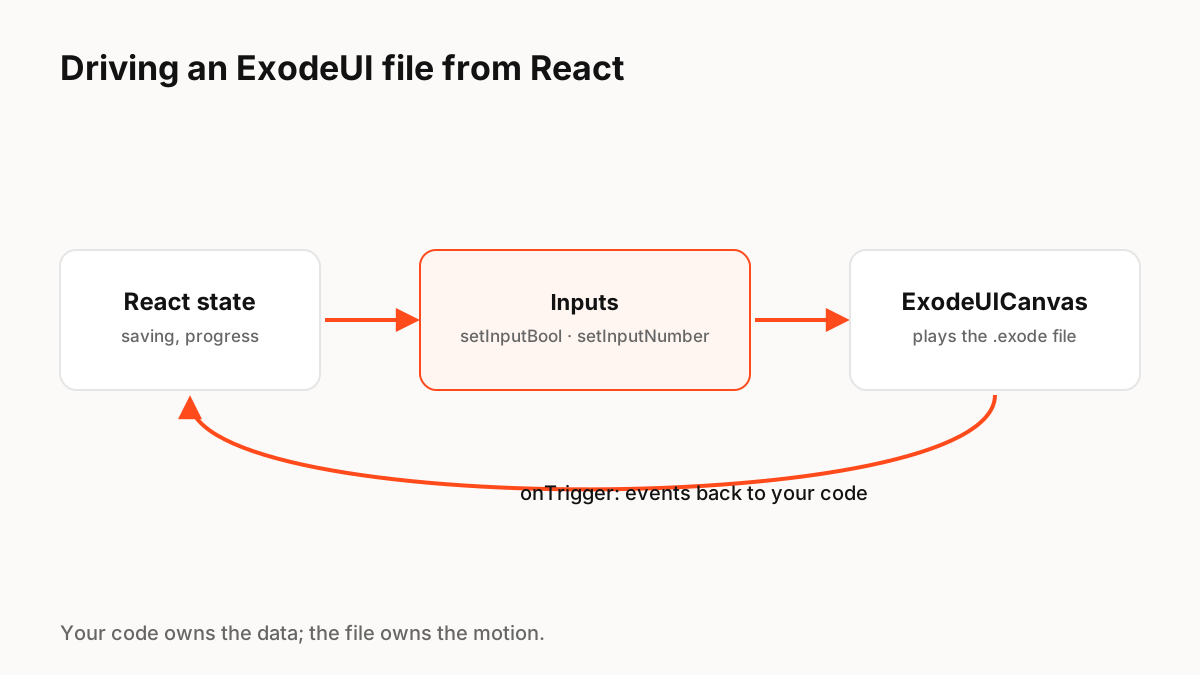
Install the exodeui package, render the file with <ExodeUICanvas>, and get the engine with the useExodeUI hook by passing setEngine to onReady. Then call setInputBool, setInputNumber or fireTrigger from React effects and handlers to drive the state machine, and listen for events with onTrigger. Your React state stays the source of truth; the file owns the motion.
The model: your code owns data, the file owns motion
An ExodeUI file contains layers, states, transitions and the inputs that switch between them. Your React component decides when those inputs change, based on its own state. That split keeps animation code out of your components and lets designers change the motion without touching React.
Setup
Install the React runtime with npm install exodeui. If you use Vite, add exodePlugin() from exodeui/vite-plugin to your Vite config so .exode files can be imported directly; otherwise pass a URL to the file with the src prop.
- ExodeUICanvas props: src (URL) or artboard (imported data), fit, alignment, autoPlay, onReady, onTrigger, onInputUpdate.
- useExodeUI returns setEngine plus setInputBool, setInputNumber, setInputText, setInputNumberArray, setInputStringArray, fireTrigger and getInputValue.
- Input names must match the names defined in the file.
Booleans, numbers and triggers
Use a boolean for a state that stays on, such as Loading. Use a number for continuous values, such as progress from 0 to 100. Use a trigger for a one-off moment, such as Success, which fires once and resets. In React, set booleans and numbers in an effect that depends on the state, and fire triggers in the handler where the event happens.
Events back to React
Animations can also tell your code that something happened, for example that a button inside the file was pressed or a success animation finished. Handle these with onTrigger, which receives the trigger name, and keep the real work, such as API calls, in your React code.
Testing and accessibility
Because the motion is driven by inputs, you can test the React side by checking which inputs are set for each state. Keep real buttons and labels in the DOM, or use the ExodeSEO component, which can generate a visually hidden HTML layer for screen readers. Pass a reduced-motion boolean from the user's system setting if your file defines one.
Production Implementation Snippet
import { useEffect } from 'react';
import { ExodeUICanvas, useExodeUI } from 'exodeui';
import saveButton from './save-button.exode'; // needs exodePlugin() from 'exodeui/vite-plugin'

export function SaveButton({ saving, progress, justSaved, onSave }) {
  const { setEngine, setInputBool, setInputNumber, fireTrigger } = useExodeUI();

  // Boolean: a state that stays on while saving
  useEffect(() => { setInputBool('Loading', saving); }, [saving, setInputBool]);

  // Number: continuous progress, 0 to 100
  useEffect(() => { setInputNumber('Progress', progress); }, [progress, setInputNumber]);

  // Trigger: a one-off moment
  useEffect(() => { if (justSaved) fireTrigger('Success'); }, [justSaved, fireTrigger]);

  return (
    <div style={{ width: 240, height: 64 }}>
      <ExodeUICanvas
        artboard={saveButton}
        onReady={setEngine}
        onTrigger={(name) => { if (name === 'Pressed') onSave(); }}
      />
    </div>
  );
}
Key Principles to Remember
- Render with ExodeUICanvas and pass setEngine from useExodeUI to onReady
- Booleans for ongoing states, numbers for continuous values, triggers for moments
- Set inputs from React effects and handlers; React state stays the source of truth
- Handle events from the file with onTrigger
- Keep app logic in React, motion in the file
Frequently Asked Questions
Sources
- exodeui (React runtime) — npm