Tooltips That Explain Without Getting in the Way
How to design tooltips that help: brief supplemental information, hover and keyboard access, touch alternatives, and why essential instructions never belong in a tooltip.
Core Takeaway
Tooltips are brief messages that appear on hover or keyboard focus to give supplemental information, such as what a metric means. Keep them short, never put essential instructions in them, make them reachable by keyboard, provide a tap-based alternative on touch screens, and do not put links or buttons inside.
What a tooltip is
Nielsen Norman Group defines a tooltip as a brief, informative message that appears when a user interacts with an element, initiated by a mouse hover or a keyboard hover (keeping keyboard focus on an element). Because they depend on hover, tooltips are not normally available on touchscreens.
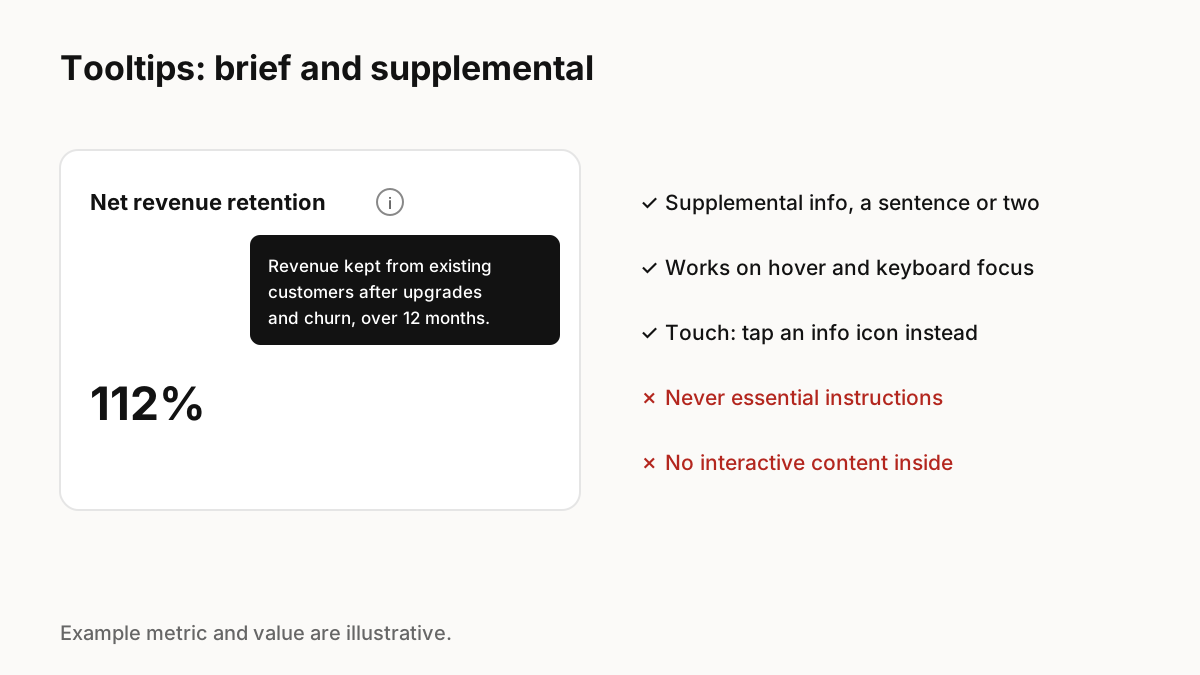
Supplemental, never essential
NN/g gives a clear example of a mistake: a site that put password requirements in a tooltip. Information people need to complete a task should be on screen. Tooltips suit definitions, explanations of why a field is asked for, and labels for icon-only buttons.
Accessibility
Make tooltips usable for everyone:
- Open on keyboard focus as well as hover.
- Let people dismiss it with Escape without moving focus.
- Keep it open while the pointer moves onto it.
- Connect it to its trigger so screen readers announce it.
- Do not put interactive content inside; use a popover instead.
Tooltips on touch devices
Hover does not exist on touch. Use a visible info icon that opens a small popover on tap, or show the explanation inline. For complex enterprise metrics, an info icon next to the label is a familiar pattern on every device.
Motion and timing
A short delay before showing avoids tooltips flickering as the pointer passes over elements; once one is open, neighbouring tooltips can appear immediately. A quick fade or small scale from the trigger helps people see where it came from. Keep it under about 150 milliseconds.
Key Principles to Remember
- Tooltips are brief and supplemental
- Never hide essential instructions in a tooltip
- Support keyboard focus and Escape
- Use a tappable info icon on touch devices
- No interactive content inside tooltips
Frequently Asked Questions
Sources
- Tooltip Guidelines — Nielsen Norman Group