How Animation Affects Core Web Vitals (LCP, INP and CLS)
How animations and animation runtimes affect LCP, INP and CLS, and practical ways to keep motion rich without hurting Core Web Vitals.
Core Takeaway
Animation can hurt all three Core Web Vitals: heavy animation files and runtimes can delay LCP, JavaScript-driven animation can block the main thread and worsen INP, and animating layout properties or loading animations without reserved space causes CLS. Keep hero content independent of animation, lazy-load runtimes below the fold, animate transform and opacity, and reserve space for every animated element.
The three metrics and their targets
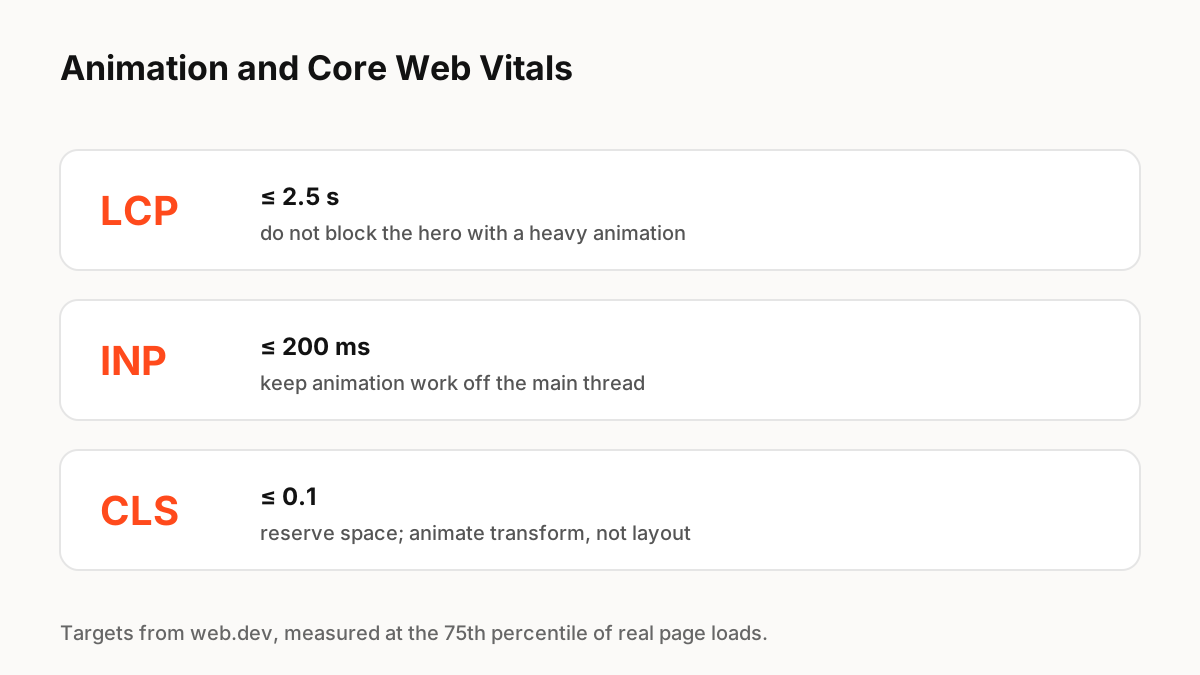
Google's Core Web Vitals, documented on web.dev, measure loading (Largest Contentful Paint, good at 2.5 seconds or less), responsiveness (Interaction to Next Paint, good at 200 milliseconds or less) and visual stability (Cumulative Layout Shift, good at 0.1 or less), measured at the 75th percentile of real page loads.
LCP: do not make the hero wait for animation
If the largest element on screen is an animation that needs a runtime and a file to load first, LCP waits for both. Render a static image or real text first, then enhance it, and load animation runtimes only for content near or below the fold when it is needed.
INP: keep the main thread free
INP measures how quickly the page responds to taps and clicks. Web.dev explains that long tasks on the main thread delay the response to input. Animation that runs complex JavaScript on every frame, or many animations starting at once, can cause exactly that. Prefer CSS transitions on transform and opacity for simple effects, pause offscreen animations, and avoid starting heavy work in response to an interaction.
CLS: reserve space and animate transform
Web.dev recommends using the CSS transform property to animate without triggering layout shifts: scale instead of changing width and height, translate instead of changing top or left. Give every animated element, including canvas-based animations, fixed dimensions before it loads, so the page does not jump when it appears.
Canvas runtimes
Canvas-based runtimes such as Lottie's canvas renderer, Rive and ExodeUI draw outside the DOM, which avoids layout work per frame but adds a runtime to download and run. Measure the trade-off for your page: lazy-load the runtime, size the canvas in CSS up front, and test on mid-range phones.
Key Principles to Remember
- Targets: LCP ≤ 2.5 s, INP ≤ 200 ms, CLS ≤ 0.1 at the 75th percentile
- Do not make the LCP element depend on an animation runtime
- Keep the main thread free during interactions
- Animate transform and opacity; reserve space for animated elements
- Lazy-load runtimes and test on mid-range phones
Frequently Asked Questions
Sources
- Web Vitals — web.dev
- Interaction to Next Paint (INP) — web.dev
- Cumulative Layout Shift (CLS) — web.dev