GIF Loaders vs Vector Animation: Why Teams Are Replacing Animated GIFs in UI
Why animated GIFs are a poor fit for UI loaders and icons, what to use instead (CSS, SVG, Lottie, video, state-based runtimes) and how to choose.
Core Takeaway
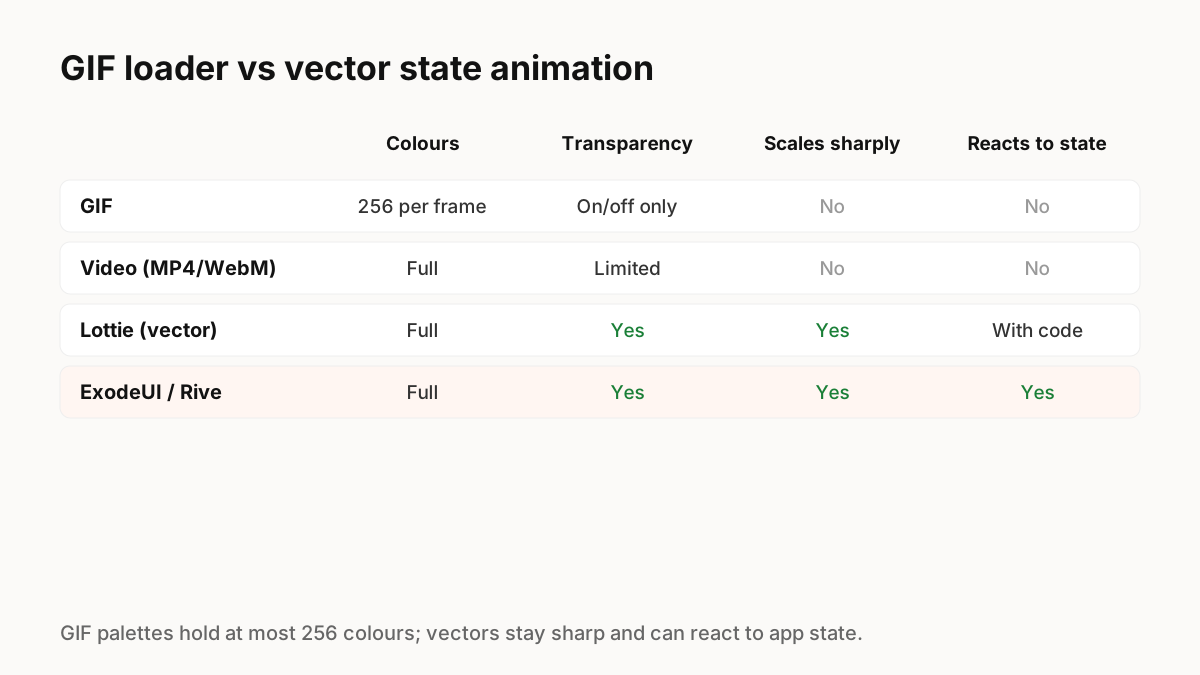
Animated GIFs are limited to palettes of at most 256 colours, have on-or-off transparency, blur when scaled and cannot react to app state. For UI loaders and icons, CSS or SVG animation is usually lighter and sharper; Lottie works for richer illustrations; and state-based runtimes such as ExodeUI or Rive are best when the animation must change with loading, success and error.
What GIF can and cannot do
MDN's image format guide explains that each GIF pixel is an index into a palette of at most 256 colours, and notes that older formats such as GIF perform poorly compared with newer ones such as WebP and AVIF. For UI, the practical problems are banding in gradients, jagged edges on transparent backgrounds, blurry scaling on high-density screens, and no way to respond to what the app is doing.
What to use instead
Choose by what the animation needs to do:
- Simple spinner or pulse: CSS animation or an inline SVG. Tiny, sharp, and easy to pause for reduced motion.
- Illustrated loop or icon: Lottie or animated SVG. Vector, scalable, small for simple artwork.
- Photographic or complex footage: video (WebM or MP4) or animated WebP/AVIF, not GIF.
- Loader that turns into success or error: a state-based runtime such as ExodeUI or Rive, driven by your app's state.
Loaders should know what is happening
A GIF loops the same way whether the request takes one second or one minute, and it cannot become a checkmark when the work is done. A state-based loader can move from loading to success or error and show progress, which tells people far more than a spinning image.
Accessibility
Looping GIFs cannot respect the reduced-motion setting on their own. CSS, SVG and runtime animations can be paused or simplified when the user asks for less motion. Also give loaders an accessible label, such as "Loading results", so screen reader users know what is happening.
Key Principles to Remember
- GIF palettes hold at most 256 colours and scale poorly
- Use CSS or SVG for simple loaders
- Use Lottie for illustrated loops, video for footage
- Use a state-based runtime when loading must turn into success or error
- Support reduced motion and add accessible labels
Frequently Asked Questions
Sources
- Image file type and format guide — MDN Web Docs
- lottie-web — GitHub (Airbnb)
- prefers-reduced-motion — MDN Web Docs