Generative UI Guardrails: Designing for Intent Without Breaking Your Design System
How UX changes when AI builds the interface on the fly, and how to structure components, tokens and checks so generated UI stays accessible and on-brand.
Core Takeaway
Generative UI means an AI model assembles part of the interface for each request. To keep it usable, let the model choose from an approved catalog of components rather than writing raw styles, pass it your design tokens, validate its output (contrast, type scale, focus order, reduced motion) before rendering, and keep a fixed frame of navigation and controls around the generated area.
From fixed layouts to designing for intent
In a fixed layout, designers decide every screen in advance. With generative UI, an AI model decides which interface to show for a specific request. Google describes generative UI as a model generating not only content but an entire experience, and it now ships experiments based on this in the Gemini app and in AI Mode in Google Search. In developer tools, the Vercel AI SDK describes a simpler version: the model calls a tool, and the result of that tool call is rendered as a React component.
What changes for UX
Designers stop drawing every screen and start designing the rules: which components exist, when each one is appropriate, and what must never change. The frame around generated content, such as navigation, the input, undo and settings, should stay fixed so people never lose their place. Generated areas should be clearly marked, and people should be able to switch to a plain, predictable view.
Guardrail 1: an approved component catalog
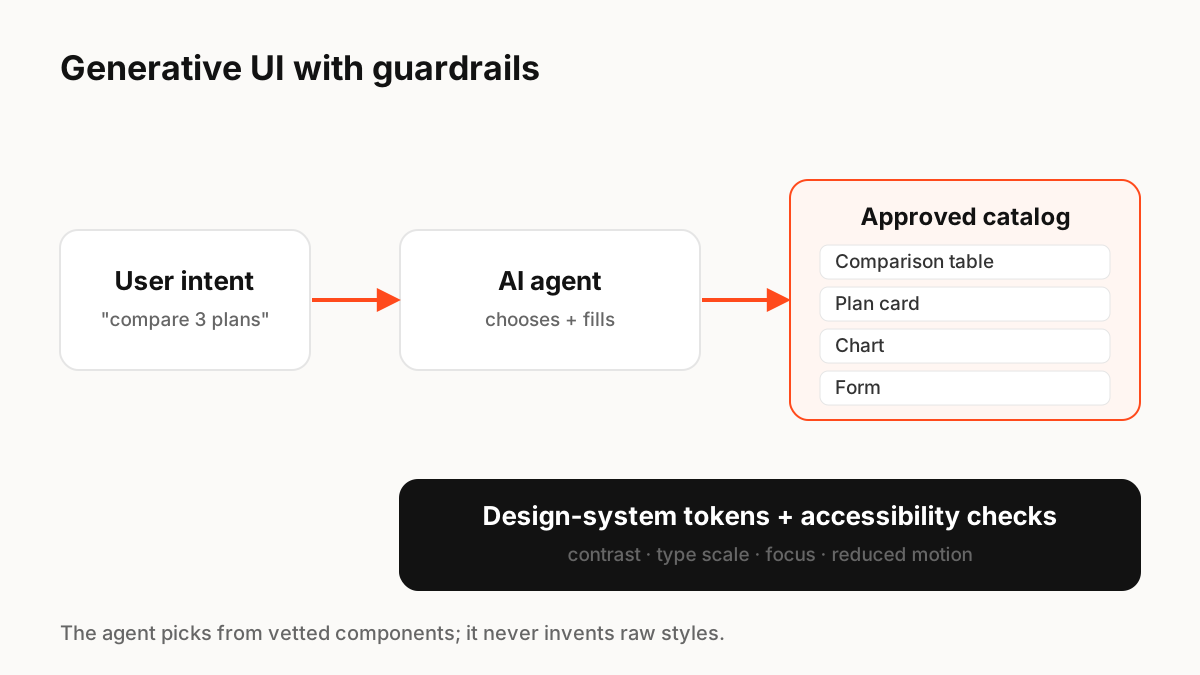
The safest pattern is to let the model choose and fill components, not invent them. A2UI, an open protocol created by Google, works this way: agents send declarative component descriptions, and the client renders them with its own native widgets, without running arbitrary code from the agent. Your catalog can be small: tables, cards, charts, forms, lists, each built and tested by your team.
Guardrail 2: tokens instead of raw values
Give the model semantic tokens, such as color.text.primary or space.4, and reject output that uses raw hex values or arbitrary font sizes. This keeps contrast, typography and spacing inside the system, and themes such as dark mode or high contrast keep working automatically.
Guardrail 3: validate before you render
Run automatic checks on generated output before showing it: required fields present, colour contrast, heading order, labels on inputs, focus order, touch target size and reduced-motion support. If a check fails, fall back to a simple, known-good layout rather than showing broken UI.
- Schema validation: only known components and properties
- Accessibility: contrast, labels, roles, focus order
- Content limits: maximum items, text length, image sizes
- Fallback: a plain list or text answer if validation fails
Key Principles to Remember
- Generative UI = the model assembles interface for each request
- Keep a fixed frame (navigation, input, undo) around generated areas
- Let the model choose from an approved catalog instead of writing raw UI
- Pass semantic tokens and reject raw values
- Validate accessibility before rendering and keep a fallback
Frequently Asked Questions
Sources
- Generative UI: A rich, custom, visual interactive user experience for any prompt — Google Research
- A2UI: A Protocol for Agent-Driven Interfaces — a2ui.org
- Generative User Interfaces — Vercel AI SDK docs
- Design tokens overview — Material Design 3