可存取的焦點狀態:設計可見的鍵盤焦點
How to design visible keyboard focus that meets WCAG 2.2: what 2.4.7 and 2.4.13 require, how :focus-visible works, and design tips for focus rings.
核心要點
每个交互元素都需要为键盘用户提供清晰可见的焦点指示器; WCAG 2.2 要求其级别为 AA (2.4.7)。要获得强大的指标,请瞄准 WCAG 的 AAA 指南 (2.4.13):至少元素周围 2 CSS 像素轮廓的区域,聚焦和未聚焦状态之间的对比度为 3:1。使用 :focus-visible 為鍵盤使用者顯示環,而不是在每次點擊滑鼠時顯示環。
為什麼焦點狀態很重要
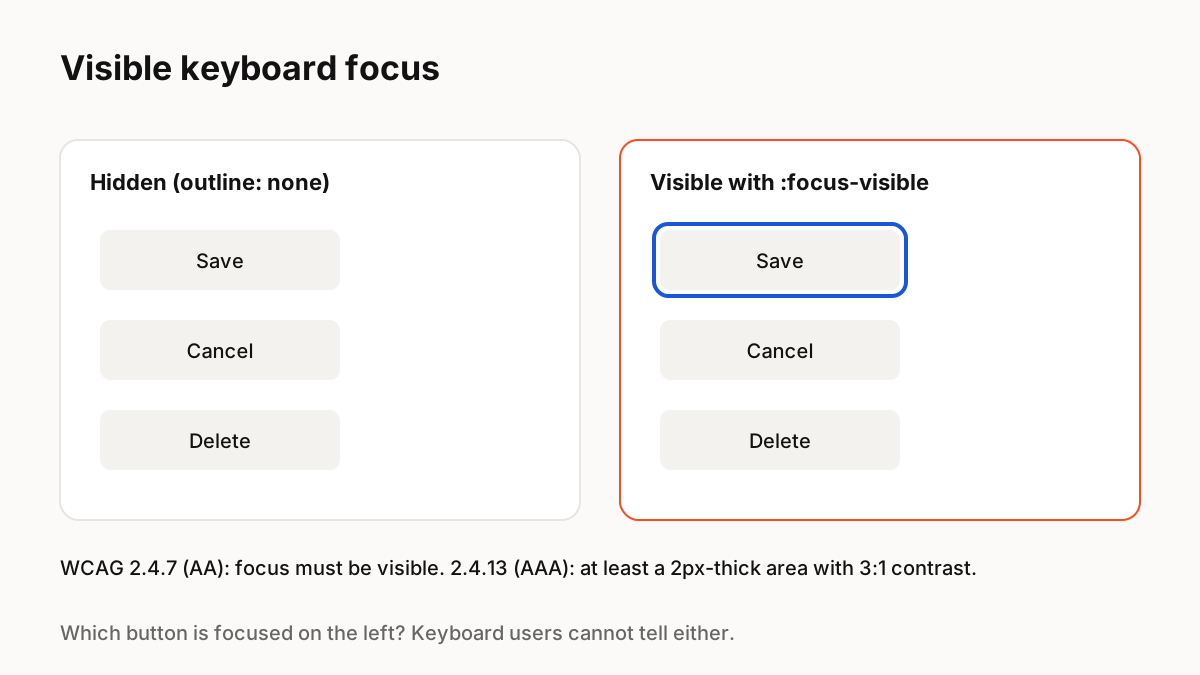
使用鍵盤、開關設備或螢幕放大鏡的使用者一次在頁面中移動一個元素。焦點指示器是他們知道自己所在位置的唯一方法。刪除瀏覽器輪廓而不進行替換是最常見的輔助功能失敗之一。
WCAG 2.2 需要什麼
Success criterion 2.4.7 Focus Visible (level AA) requires that any keyboard-operable interface has a mode where the focus indicator is visible. WCAG 2.2 added 2.4.13 Focus Appearance (level AAA), which describes a strong indicator: at least as large as the area of a 2 CSS pixel thick perimeter of the component, with a contrast ratio of at least 3:1 between the focused and unfocused states.
:焦點-可見
MDN 解释说:当元素具有焦点并且浏览器使用启发式决定应该显示焦点(通常用于键盘使用)时,适用 :focus-visible。這使您可以為鍵盤用戶顯示強大的對焦環,而無需在每次有人用滑鼠點擊按鈕時顯示它們。使用它而不是刪除輪廓。
設計戒指
實用指導:
- 使用帶有偏移的輪廓或環,這樣它就不會融入元素中。
- 檢查元素可能出現的每個背景的對比度;雙色戒指會有所幫助。
- 保持元件之間的一致性,定義為設計系統中的令牌。
- 切勿只依賴微妙的顏色變化。
- 確保焦點元素沒有隱藏在黏性標題後面。
焦點和運動
對焦環可能會以非常短的過渡出現,但應該感覺是即時的。避免延遲響鈴或移動元素的動畫,對於自訂畫布繪製元件,請確保頁面中仍然存在真正的可聚焦元素,以便鍵盤使用者可以存取它。
要記住的關鍵 Principle
- WCAG AA (2.4.7) 需要可見焦點
- 2.4.13 (AAA):2px 週長區域與 3:1 對比變化
- 使用 :focus-visible 而不是刪除輪廓
- 將對焦環定義為設計令牌
- 畫布渲染的 UI 需要真正的可對焦元素
常見問題解答
來源
- Understanding SC 2.4.7: Focus Visible — W3C 外語
- Understanding SC 2.4.13: Focus Appearance — W3C 外語
- :focus-visible — MDN 網路文檔