Every tile is live

UI Motion Showcase

Interactive UI motion you can try right here: buttons with real states, gestures with physics, menus, mascot moments, widgets and whole pages. Each example is a real .exode file running live, with its own state machine. Point at one to play it, then open the same file in ExodeUI.

Updated October 2026 · 28 live examples

  • Click the fields and type

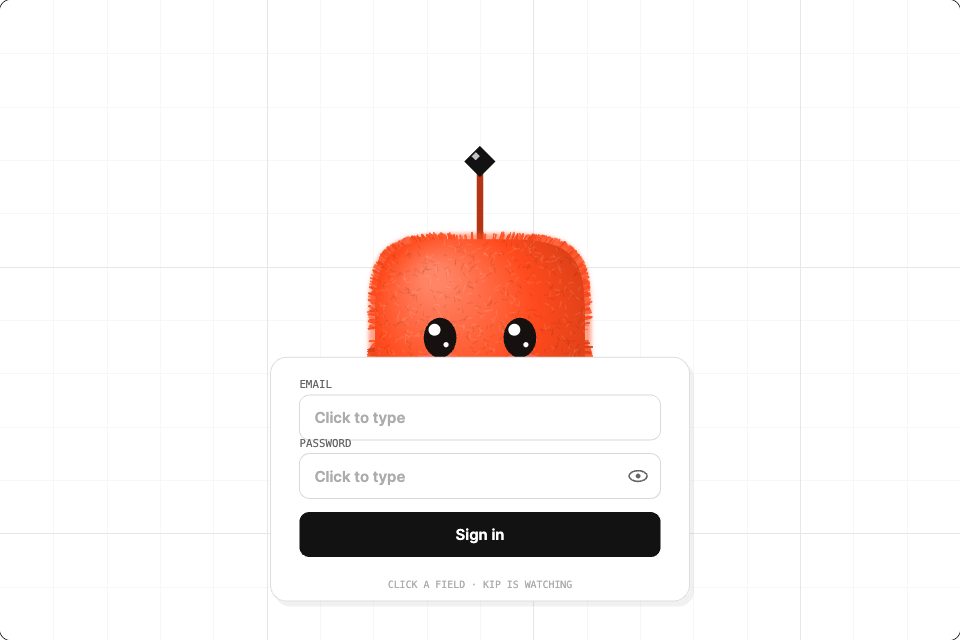
    Login guard

    Kip follows your typing and covers its eyes for the password.

    Text focus drives the look · password covers the eyes

  • Menus & navigation

    Liquid tab bar

    A liquid pill glides between five tabs.

    State machine · input selected (Number)

  • Buttons & toggles

    Jelly like button

    A heart with a jelly bounce, a +1 pop and a live counter.

    State machine · input liked (Trigger)

  • Gestures & physics

    Pull to refresh

    Drag the list down; it stretches, springs back and refreshes.

    Drag gesture · spring release

  • Widgets & cards

    Neon rain weather

    A Tokyo weather card with flickering neon and rain.

    Runtime inputs · every colour, text and motion setting

  • Menus & navigation

    Orbit menu

    Five options launch into orbit around a glowing sun.

    State machine · input isOpen (Boolean)

  • Gestures & physics

    Grab the fabric

    A cloth banner that hangs, sways and stretches where you pull.

    Cloth physics · pointer drag

  • Mascot UI moments

    Star rating

    Every star changes Kip’s mood, from heartbroken to thrilled.

    Hovered star blends five moods

  • Widgets & cards

    Activity rings

    Live activity rings on a watch face; click to change it.

    Click cycles watch faces

  • Buttons & toggles

    Send button

    Real idle, sending and sent states with a burst of sparks.

    State machine · input sent (Trigger)

  • Whole pages

    Pricing page

    A pricing page with a monthly and yearly flip.

    Toggle state · hover states

  • Widgets & cards

    Art Deco wind weather

    Gold sunburst, wind ribbons and a tumbling newspaper.

    Runtime inputs · every colour, text and motion setting

  • Buttons & toggles

    Launch button

    A 3-2-1 countdown and lift-off; click again to land.

    State machine · input launched (Trigger)

How these UI motion examples are built

State machines, not timelines

The send button moves from Idle to Sending to Sent on one trigger input, and the liquid tab bar has five states driven by a single number. Transitions are designed in the editor, so your code only says which state it wants.

See the send button

Gestures with physics

Pull to refresh stretches and springs back, the fabric banner sways where you grab it, and the mood slider blends three faces from the pointer position. The feel is set in the file and stays the same in production.

Browse the Motion UI library

Inputs your code controls

Every weather card exposes its city, temperature and every colour as runtime inputs. Pass live data and the card animates to it: colours cross-fade and the temperature counts to the new value.

Customize a weather card
import { useRef } from 'react';
import { ExodeUICanvas } from 'exodeui';

// The send button from this page, fired when your form submits.
export function MessageForm({ onSend }) {
  const engine = useRef(null);
  const submit = async (e) => {
    e.preventDefault();
    engine.current?.updateInput('sent', true); // Idle → Sending → Sent
    await onSend(new FormData(e.currentTarget));
  };
  return (
    <form onSubmit={submit}>
      <textarea name="message" />
      <button type="submit">Send</button>
      <ExodeUICanvas
        src="/exode/gallery-04-send-off.bexode"
        autoPlay
        onReady={(e) => (engine.current = e)}
        style={{ width: 200, height: 150 }}
      />
    </form>
  );
}

Frequently asked questions

Are these real interfaces or videos?
They are real. Every tile is a compiled .exode file running in the ExodeUI runtime in your browser, with its own state machine and pointer handling. Hover or tap a tile and it responds the same way it would inside an app.
Can I use these examples in my own project?
Yes. Each tile has an "Open in ExodeUI" button that loads the same file in the free web studio, where you can change it and export it. Components and weather cards also have their own pages with downloads and code.
Which frameworks can run them?
React and Next.js through the exodeui package, plus runtimes for Vue, Svelte, Angular, Solid, React Native, SwiftUI and Flutter. The same file works in all of them.
How do I control the motion from code?
Each file exposes inputs: triggers such as liked or sent, booleans such as isOpen, numbers such as selected, text and colours. Set them through the inputs prop or the engine, and the state machine takes care of the transitions.
Do I need to write animation code?
No. States, transitions, springs and gestures are built visually in the editor and stored in the file. Your code only sets inputs and listens for events.