How to Design Error Messages That Reduce Frustration
How to design error states people can recover from: placement, timing, wording, preserving input, accessibility and motion, based on usability research.
Core Takeaway
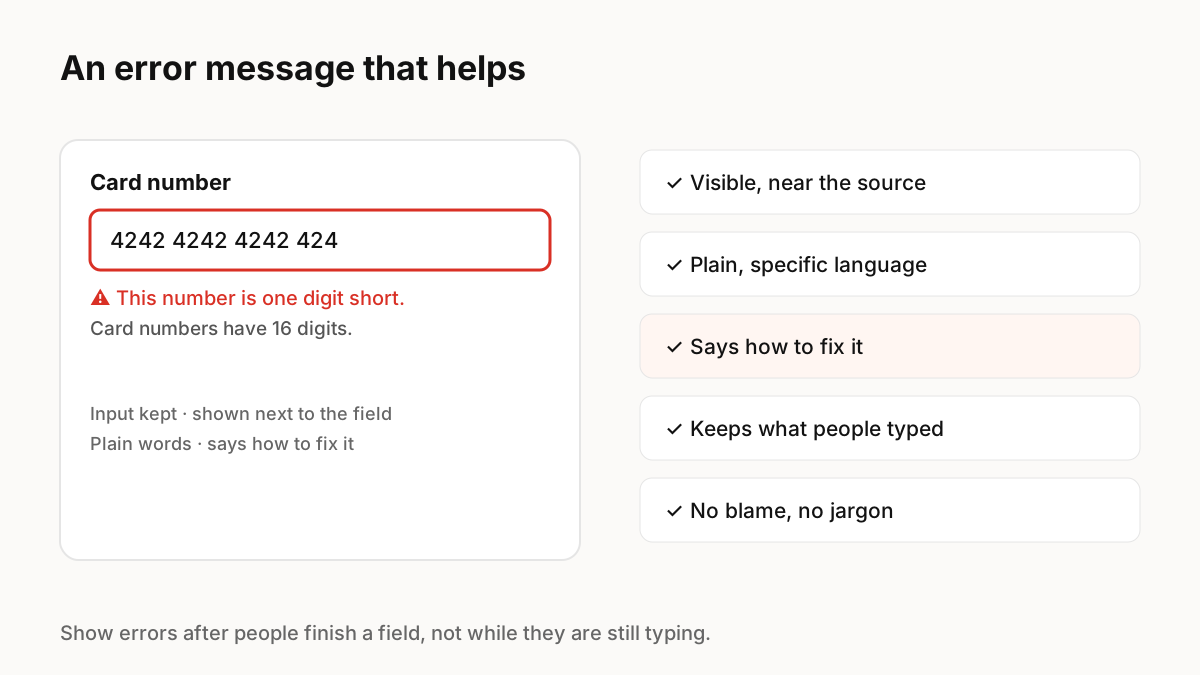
A good error message is visible and placed next to the problem, written in plain language, says how to fix it, keeps what the person already typed and never blames them. Show it when the person has finished with a field or submitted, not while they are still typing, and make sure screen readers announce it.
The guidelines
Nielsen Norman Group summarises effective error messages as highly visible, constructive and respectful of user effort. In practice that means:
- Place the message next to the field or element with the problem.
- Use plain, specific language: "This number is one digit short", not "Invalid input".
- Offer a fix: what format is expected, what to try next.
- Keep what people typed so they can edit it instead of starting again.
- Do not blame: avoid words like invalid, illegal or wrong.
Timing
Showing an error before someone has finished is one of the most common mistakes. NN/g calls premature errors a hostile pattern, like grading a test before the student has finished. Validate a field when the person leaves it or submits the form, then update the message live while they correct it.
Errors that are not about forms
For system errors such as a failed save or lost connection, say what happened, what was kept, and what the person can do: retry, work offline, or contact support. Avoid error codes on their own; if you need one for support, show it alongside a human explanation.
Accessibility
Do not rely on red alone: add an icon and text. Connect the message to its field so screen readers read it with the field, and move focus to the first error, or a summary of errors, after a failed submit.
Motion in error states
A short shake or colour change can draw attention to the field with the problem, but keep it brief, do not repeat it on every keystroke, and replace movement with a colour or icon change when reduced motion is on. The message itself matters more than the animation.
Key Principles to Remember
- Place errors next to the problem, in plain words, with a fix
- Keep what people typed
- Validate after a field is finished, not while typing
- Never rely on colour alone; connect messages for screen readers
- Keep error motion brief and respect reduced motion
Frequently Asked Questions
Sources
- Error-Message Guidelines — Nielsen Norman Group
- Indicators, Validations, and Notifications — Nielsen Norman Group