Use case · AI coding agents
Animations from AI coding agents that you can still edit.
Updated November 2026
ExodeUI has an MCP server, so AI coding agents such as Claude Code and Cursor can create and edit animations from plain-language prompts, and you still get a file you can fix by hand. The agent calls real tools to add shapes, keyframes and inputs, and the result is an open .exode JSON file. Open it in the editor, adjust the timing yourself, and ship it like any other file.
- A first draft from one promptThe agent builds the layers, keyframes and inputs.
- Editable, not throwawayFix the timing in the editor instead of prompting again.
- ReviewableOpen JSON that sits in your repo next to your code.
Free Community plan · Browser, macOS and Windows
 Open in ExodeUIFree
Generated code you cannot touch vs a file you can
The usual way
- The agent writes hundreds of lines of CSS keyframes or animation code.
- A designer cannot open that code to adjust the timing or the curve.
- Every small change means another prompt and another code review.
With ExodeUI
- The agent writes an .exode file through MCP tools.
- A designer opens it in the editor and fixes timing by hand.
- The file has inputs, so your app controls it like any component.
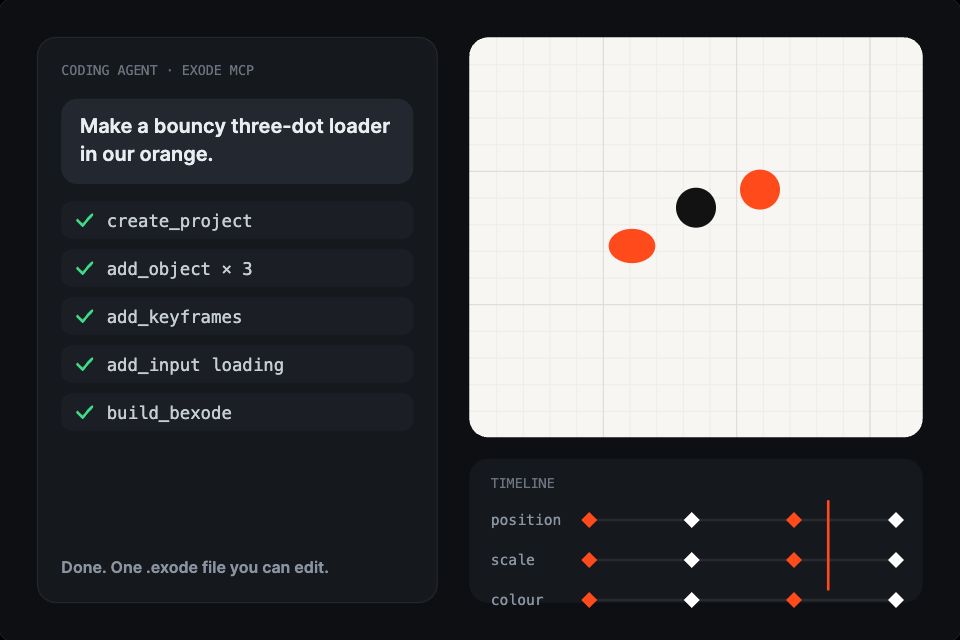
What happens in the demo
The tool names in the demo are real ExodeUI MCP tools. An agent does not draw pixels; it builds the same layers, keyframes and inputs a person would.
- You describe what you want
"a bouncy three-dot loader"The prompt goes to your agent, in your editor or terminal - The agent starts a file
create_projectA new project and artboard appear - It adds the parts and the motion
add_object · add_keyframesShapes land on the canvas and keyframes drop onto the timeline - It makes the animation controllable
add_inputAn input your app can set, such as loading or liked - It builds the file for your app
build_bexodeA compact file the runtimes load. Hover the result: every layer is still editable
Connect your agent and try one prompt
Add the ExodeUI MCP server to Claude Code or Cursor and ask for a small loader or a like button. Then open the result in the editor and change it by hand.
Free Community plan to start. Professional is $5 a month, billed yearly.
What AI agents can build with ExodeUI
Components from a prompt
Ask for a like button with a burst, or a loader with three states, and get a real file.
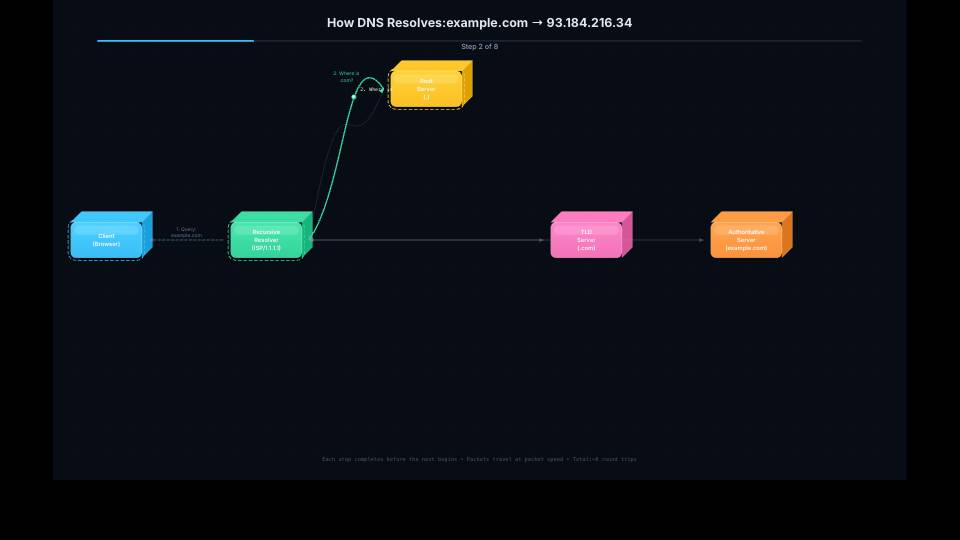
Explainers and diagrams
Step-through animations of a process, an API call or an architecture.
Edits to existing files
Ask the agent to slow a transition, add a hover state or change a colour.
Repo-wide motion work
Agents can scan a project and replace hand-written animation code with files.
Generated variants
Make five versions of a hero to compare, then keep the one that works.
Charts and data scenes
Bind generated scenes to inputs so your app supplies the numbers.
Drive it from your code
One command for Claude Code. The ExodeUI CLI can also write MCP configs for Cursor, OpenCode and VS Code.
# 1. Add the ExodeUI MCP server to Claude Code
claude mcp add exode -- npx -y claude-exode-mcp

# 2. Then prompt in plain language, for example:
# "Create ui/loader.exode: three dots that bounce in turn
#  in #ff4a1c, with a 'loading' boolean input that starts
#  and stops them. Build a .bexode for the app."
How you build it
- 1Connect your agent
One command for Claude Code. The ExodeUI CLI can also write MCP configs for Cursor, OpenCode and VS Code.
- 2Describe what you want
Prompt in plain language; the agent creates or edits the .exode file.
- 3Review and refine
Open the file in the editor to check timing and tweak it by hand.
Features for AI-generated animation
Tools for objects, keyframes, springs, inputs, state machine transitions and builds.
Open JSON, so diffs are reviewable in Git like any other code change.
The CLI can verify schemas and run accessibility audits on a file.
Agent-made files ship to React, Vue, Flutter, SwiftUI and the rest.
More live examples


When another tool is the better fit
For a single CSS transition, asking your agent to write the CSS directly is quicker. Use the MCP route when the result needs illustration, several states or a designer to refine it afterwards. ExodeUI is not affiliated with Anthropic, Cursor or any AI vendor.
Questions
Can Claude Code make animations?
Yes, with an MCP server that gives it animation tools. After claude mcp add exode -- npx -y claude-exode-mcp, Claude Code can create and edit .exode files from your prompts.
Which AI tools work with ExodeUI?
Any MCP-capable client, including Claude Code, Claude Desktop, Cursor, OpenCode and VS Code.
Is the output locked to the AI tool?
No. The output is a plain .exode JSON file you own, which opens in the ExodeUI editor and runs with the normal runtimes.
Can I edit what the agent made?
Yes. Open the file in the editor and change anything, or ask the agent for another edit.
Is ExodeUI made by Anthropic?
No. ExodeUI is an independent product. It works with Claude Code through the open MCP standard.
Will the agent get it right the first time?
Often not exactly. Treat the result as a first draft: check it in the editor, then fix the timing by hand or ask for one specific change, such as a slower ease on one layer.
Does it work in my existing repo?
Yes. The agent writes .exode files in your project, and your app loads them with the same runtime packages as files made by hand.
Related reading
Let your agent draft it. Finish it yourself.
Free to start. Your .exode files are open JSON that you own.
Other use cases: mobile apps, websites, product design, design systems, games, game ui, character animation, automotive, broadcast & streaming, film & tv, education & science.