Use case · Broadcast & streaming
Live motion graphics driven by data.
Updated November 2026
ExodeUI makes live motion graphics for streams, web broadcasts and events that update from your data instead of being re-rendered. Scoreboards, goal banners, lower thirds and alerts have inputs for names, colours and numbers. Run them as a web page, for example in an OBS browser source, or export MP4 and WebM for edits.
- One graphic, every matchTeams, colours and scores are inputs.
- Reacts to the feedA new score plays the goal sequence by itself.
- Works in OBSLoad it as a browser source, or export video.
Free Community plan · Browser, macOS and Windows
 Open in ExodeUIFree
A new render for every team and every goal
The usual way
- Goal banners are pre-rendered videos for each team, made before the match.
- An operator triggers clips by hand and types scores into a separate text layer.
- A new team or sponsor colour means a new render.
With ExodeUI
- One graphic takes team names, colours, scores and minute as inputs.
- A score change from the feed plays the goal sequence by itself.
- It runs as a web page in your streaming software, or exports to video.
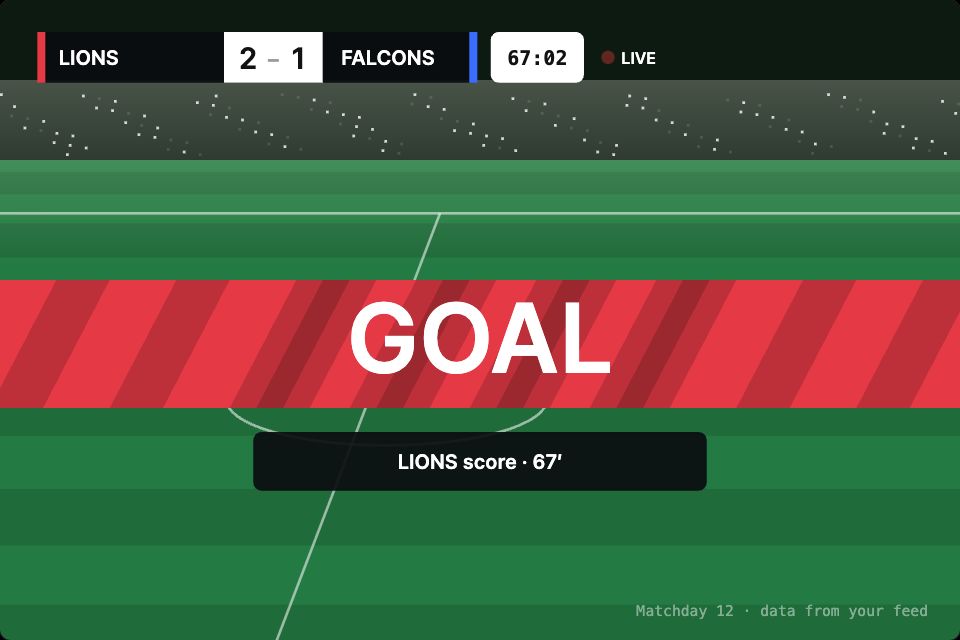
What happens in the demo
The operator or the data feed only changes values. The graphic decides what a change means: a new score plays the goal sequence, a new name just updates the text.
- The feed reports a home goal
homeScore: 3The digit rolls up, the banner wipes in with stripes and GOAL pops - A beat later
goalA lower third names the team and the minute, then everything wipes out - The match clock runs
minute: 67The clock ticks on its own from the minute you set - The next match has other teams
home: "ROVERS" · homeColorNames and colours change with no redesign - Your overlay page needs to log goals
goalAn event fires on every new goal
Build your score bug first
It is on screen the whole match. Give it team, colour and score inputs, load it as an OBS browser source and connect your feed.
Free Community plan to start. Professional is $5 a month, billed yearly.
What you can build with live motion graphics
Scoreboards and clocks
Scores, timers and stats from a feed, updated live, like the demo.
Goal and event banners
Sequences that play by themselves when a number goes up.
Lower thirds
Name and title straps with in, hold and out states and text inputs.
Stream alerts
Follower, donation and goal alerts fired by a trigger.
Tickers and data bugs
Rolling numbers and headlines bound to inputs.
Event screens
Countdowns and speaker cards for conferences and live shows.
Drive it from your code
These are the real inputs and events of the demo above. Your app sets the inputs; the file decides how each change looks.
| Name | Type | What it does |
|---|---|---|
home, away | Text | Team names. |
homeScore, awayScore | Number | Scores. An increase plays the goal sequence. |
homeColor, awayColor | Text | Team colours, as hex values. |
minute | Number | The match minute the clock starts from. |
goal | Event | Fires when a new goal plays. |
import { useEffect, useState } from 'react';
import { ExodeUICanvas } from 'exodeui';

// A browser-source page that polls your score feed.
export default function Scoreboard() {
  const [m, setM] = useState(null);
  useEffect(() => {
    const id = setInterval(async () => {
      setM(await (await fetch('/api/match')).json());
    }, 2000);
    return () => clearInterval(id);
  }, []);
  if (!m) return null;
  return (
    <div style={{ width: '100vw', height: '100vh' }}>
      <ExodeUICanvas
        src="/scoreboard.bexode"
        autoPlay
        fit="Layout"
        inputs={{
          home: m.home.name, away: m.away.name,
          homeScore: m.home.goals, awayScore: m.away.goals,
          homeColor: m.home.color, awayColor: m.away.color,
          minute: m.minute
        }}
      />
    </div>
  );
}
How you build it
- 1Design the package
Build the graphics with your type, colours and motion.
- 2Add inputs
Text for names, numbers for scores, triggers for in and out.
- 3Go live or export
Load the page in your streaming software, or export MP4, WebM, GIF or PNG frames.
Features for stream overlays and data-driven graphics
Read a scoreboard or stats feed on a timer, without code.
Change copy and values without editing the design.
MP4, WebM, GIF and PNG frames from the editor.
Word reveal, glitch, marquee and other text presets.
More live examples
When another tool is the better fit
ExodeUI is not a broadcast playout system and does not output SDI or NDI. Control rooms running on-air graphics should use a dedicated broadcast graphics system. ExodeUI fits streamers, web broadcasts, events and social video.
Questions
Can I use ExodeUI graphics in OBS?
Yes. Publish the graphic as a web page and add it as a browser source. Inputs and polled data keep updating while it is on screen.
Can the graphics update from live data?
Yes. API variables can poll an endpoint, and your own page can pass new values through inputs, as in the scoreboard code above.
Can I export to video?
Yes. The editor exports MP4, WebM, GIF and PNG frames.
Is ExodeUI a replacement for a broadcast graphics system?
No. It does not do SDI or NDI playout. It suits streaming, web broadcasts, events and social clips.
Can non-designers update the graphics?
Yes. Names, colours and scores are inputs, so an operator changes them without touching the design.
Is it reliable enough for a live show?
Test it like any browser source: rehearse with your real feed and keep a static fallback graphic ready. For large multi-camera productions, a dedicated broadcast graphics system is the safer choice.
What if the feed sends a wrong score?
Set the corrected value and the graphic updates. A goal sequence only plays when a score goes up, so a correction downwards does not trigger a banner.
Related reading
Build the package once. Let the data run it.
Free to start. Your .exode files are open JSON that you own.
Other use cases: mobile apps, websites, product design, ai coding agents, design systems, games, game ui, character animation, automotive, film & tv, education & science.