Use case · Education & science
Interactive science simulations learners can change.
Updated November 2026
ExodeUI builds interactive science simulations for e-learning, so learners discover cause and effect instead of only watching it. They change a variable, such as the length of a pendulum or the planet it swings on, and see the result straight away. Share a lesson with a link, embed it as HTML, or export video for slides.
- Learning by doingLearners change a value and see what happens.
- Real modelsThe physics runs live, not as a fixed clip.
- Fits your courseLink, HTML embed or video export.
Free Community plan · Browser, macOS and Windows
 Open in ExodeUIFree
Watching a video vs running the experiment
The usual way
- Learners watch a video of a pendulum with one length and one gravity.
- Trying another value means another video, or a lab session.
- A custom simulation needs a developer and a physics library.
With ExodeUI
- Learners change length and planet themselves and see the result.
- The physics, the graph and the readouts live in one file.
- Teachers embed it with a link or HTML next to the lesson text.
What happens in the demo
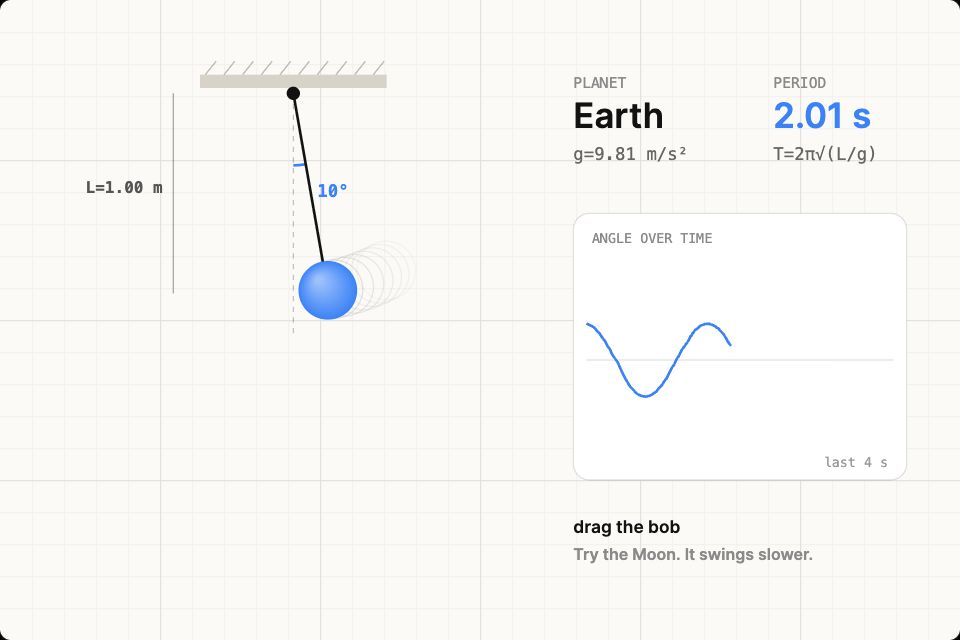
Each frame the file works out the swing from the real equation of motion. The learner never sees the maths unless they want to; they see cause and effect.
- The learner drags the bob and lets go
releaseIt swings, slowly loses energy, and the angle is traced on the graph - They make the string longer
length: 2The swing slows down and the period readout goes up - They take it to the Moon
planet: "moon"With weaker gravity a 2 m pendulum takes about 7 seconds per swing, against 2.8 on Earth - They take it to Jupiter
planet: "jupiter"Stronger gravity makes it swing fast - The lesson asks a question
length · planetThe readout shows T = 2π√(L/g), so learners can check their answer
Build a simulation for your next lesson
Pick one concept with one or two variables, like the pendulum, and let learners change them. Share it as a link with the class.
Free Community plan to start. Professional is $5 a month, billed yearly.
What you can build with interactive science simulations
Physics simulations
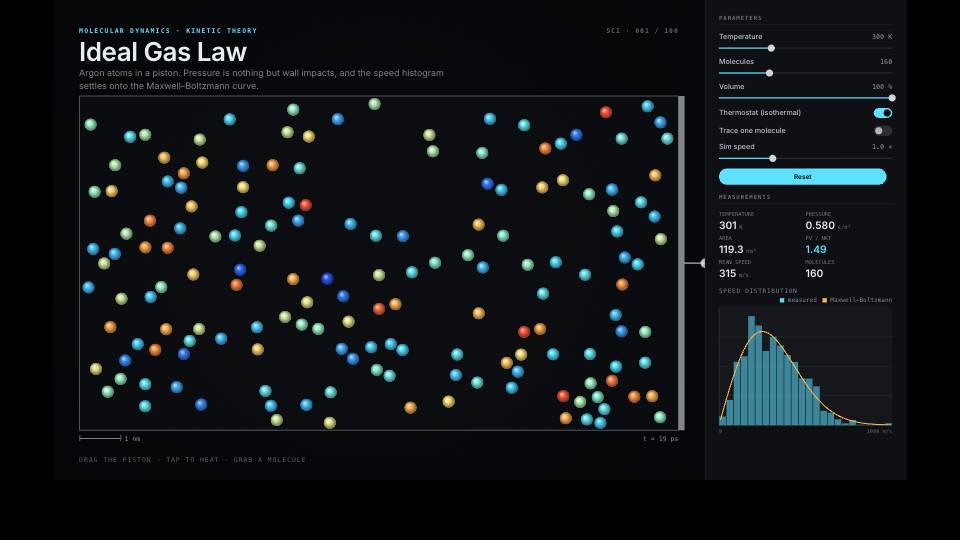
Pendulums, springs, collisions and gas laws with sliders for each variable, like the demo.
Biology models
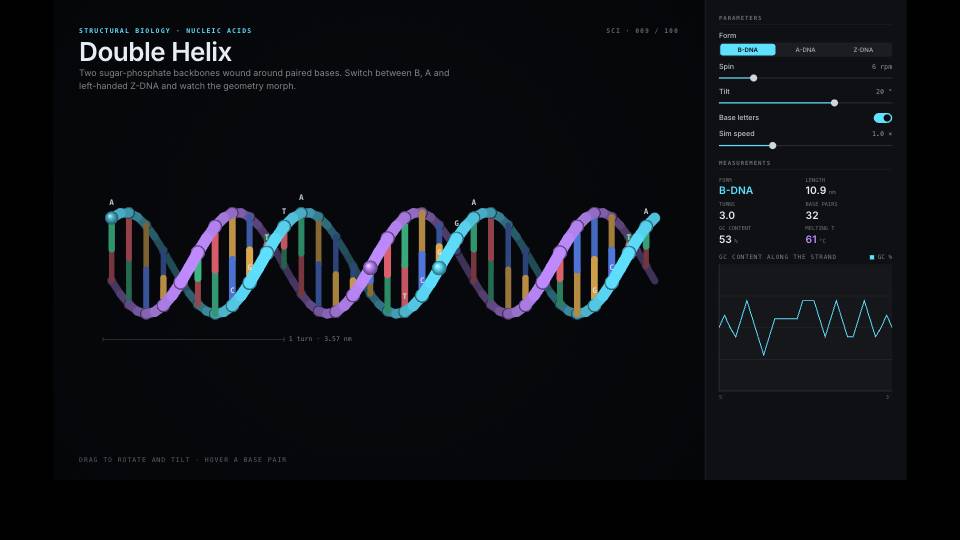
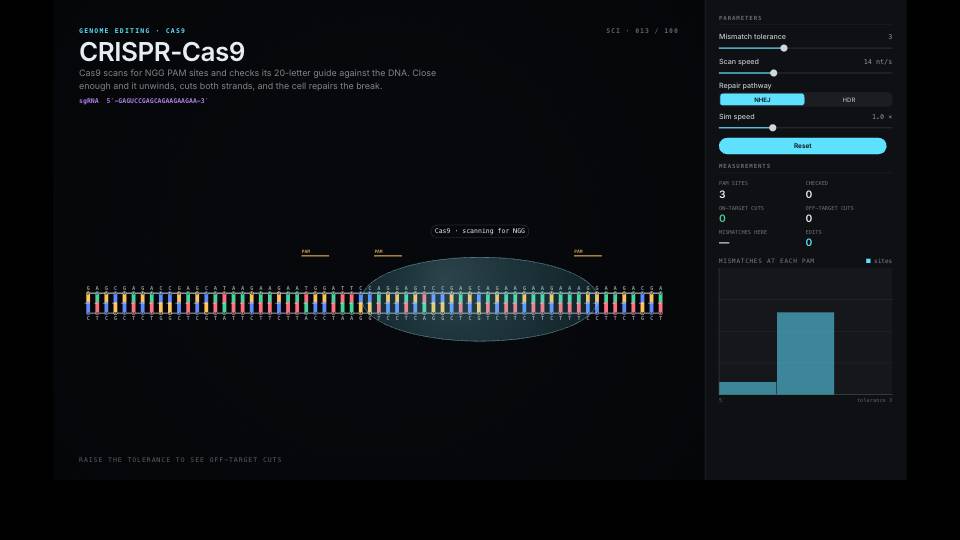
DNA, protein folding and cell processes, step by step.
Process explainers
How a network request, an engine or a supply chain works, one stage at a time.
Quizzes with feedback
Answers that trigger success or hint states.
Research figures
Mechanism-of-action figures for talks and papers.
Course intros
Animated openers and characters for online courses.
Drive it from your code
These are the real inputs and events of the demo above. Your app sets the inputs; the file decides how each change looks.
| Name | Type | What it does |
|---|---|---|
length | Number | String length in metres, 0.3 to 2. |
planet | Text | earth, moon, mars or jupiter. Sets the gravity. |
release | Event | Fires when the learner lets go of the bob. |
import { useState } from 'react';
import { ExodeUICanvas } from 'exodeui';

// A lesson page: the question is yours, the physics is in the file.
export function PendulumLesson() {
  const [planet, setPlanet] = useState('earth');
  return (
    <>
      <div style={{ width: '100%', aspectRatio: '3 / 2' }}>
        <ExodeUICanvas
          src="/pendulum.bexode"
          autoPlay
          fit="Layout"
          inputs={{ planet, length: 1 }}
        />
      </div>
      <p>Which planet makes the pendulum swing slowest?</p>
      {['earth', 'moon', 'mars'].map((p) => (
        <button key={p} onClick={() => setPlanet(p)}>{p}</button>
      ))}
    </>
  );
}
How you build it
- 1Build the model
Draw it, or start from a science template.
- 2Expose the variables
Turn the values learners should change into inputs and sliders.
- 3Share the lesson
Send a link, embed HTML in your course, or export video.
Features for e-learning simulations
Rapier 2D physics, fields and constraints.
Formulas between inputs, without code.
Screens with transitions for step-by-step lessons.
MP4, WebM, GIF and PNG frames for slides and videos.
More live examples
When another tool is the better fit
For full courses with tracking, grading and certificates, use a learning platform or authoring tool and embed ExodeUI simulations inside it. ExodeUI does not package SCORM courses.
Questions
What makes a science simulation interactive?
Learners can change its inputs, such as length, gravity, temperature or a DNA sequence, and see the result, instead of watching a fixed clip.
Is the pendulum in the demo a real simulation?
Yes. It integrates the pendulum equation each frame with a little damping. The period readout uses the small-swing formula T = 2π√(L/g), so it is closest for small swings.
Can I embed simulations in my course?
Yes. Share a hosted link or export HTML and embed it in your course page or platform.
Do I need to code the physics?
No. Physics, springs and constraints are built in, and logic nodes handle formulas.
Can I export a video version?
Yes. Export MP4, WebM, GIF or PNG frames.
Is there a free plan for teachers?
Yes. The Community plan is free. Professional is $5 a month, billed yearly.
Will it work on school devices?
It runs in a modern web browser, so it works on most laptops, Chromebooks and tablets with an up-to-date browser. Test it on your own devices before a class.
Can I check what learners did?
The simulation fires events, such as release in the demo, which your learning platform can record if it accepts custom events.
Related reading
Let learners run the experiment themselves.
Free to start. Your .exode files are open JSON that you own.
Other use cases: mobile apps, websites, product design, ai coding agents, design systems, games, game ui, character animation, automotive, broadcast & streaming, film & tv.