Use case · Product design
Interactive prototyping that becomes the product.
Updated November 2026
ExodeUI is an interactive prototyping tool for product designers who want people to test the real behaviour, not linked screens. You give a component real states, such as idle, loading, success and error, and the rules that move between them. Developers load the same file in code, so what you tested is what ships.
- Every path, not just the happy oneLoading, error and retry are part of the prototype.
- No spec to rebuild fromDevelopers load the file you tested.
- Edge cases found in reviewSwitch an input to see a declined card before QA does.
Free Community plan · Browser, macOS and Windows
 Open in ExodeUIFree
Prototypes that stop at the happy path
The usual way
- The prototype links a few static frames; loading and error are separate screens nobody clicks.
- Developers rebuild the states and timing from a spec, and the details change on the way.
- Edge cases, such as a declined card, are found late in QA.
With ExodeUI
- The prototype has the real states and transitions, so reviewers can test the bad paths too.
- Developers load the same file and connect outcome to the payment API.
- Timing, springs and copy are decided once, by the designer.
What happens in the demo
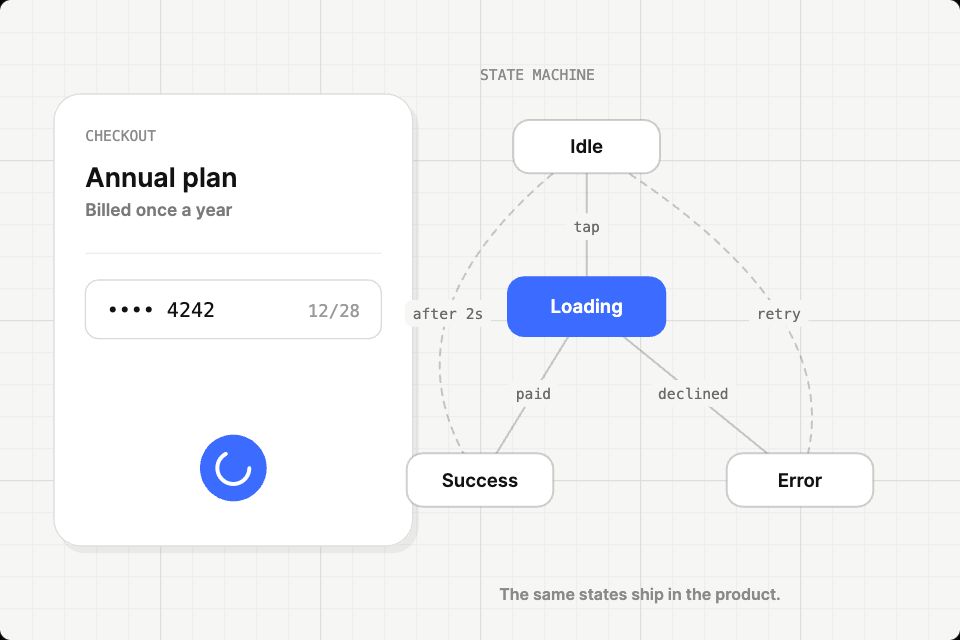
Most prototypes only show the happy path. This one runs the whole state machine, so a reviewer can see the slow, failed and retried versions of the same tap.
- The user taps Pay
tap → LoadingThe button shrinks into a spinner and the Loading state lights up - The payment goes through
outcome: "success"A tick draws itself, the button turns green, then resets after two seconds - The card is declined
outcome: "error"The button shakes, the field turns red and the copy says what to do next - The user taps Try again
retryThe flow goes back through Loading, like the real product would - Developers need to know the state
stateEvery change fires an event the app can log or act on
Prototype your trickiest component first
Pick the one with the most states, such as a payment button or an upload, and give it a real state machine. It is the fastest way to see if it fits your team.
Free Community plan to start. Professional is $5 a month, billed yearly.
What you can build with interactive prototypes
Component states
Default, hover, pressed, loading, success and error in one component, with the rules between them.
Checkout and payment flows
Test the slow, failed and retried paths, not just the happy one.
Configurators
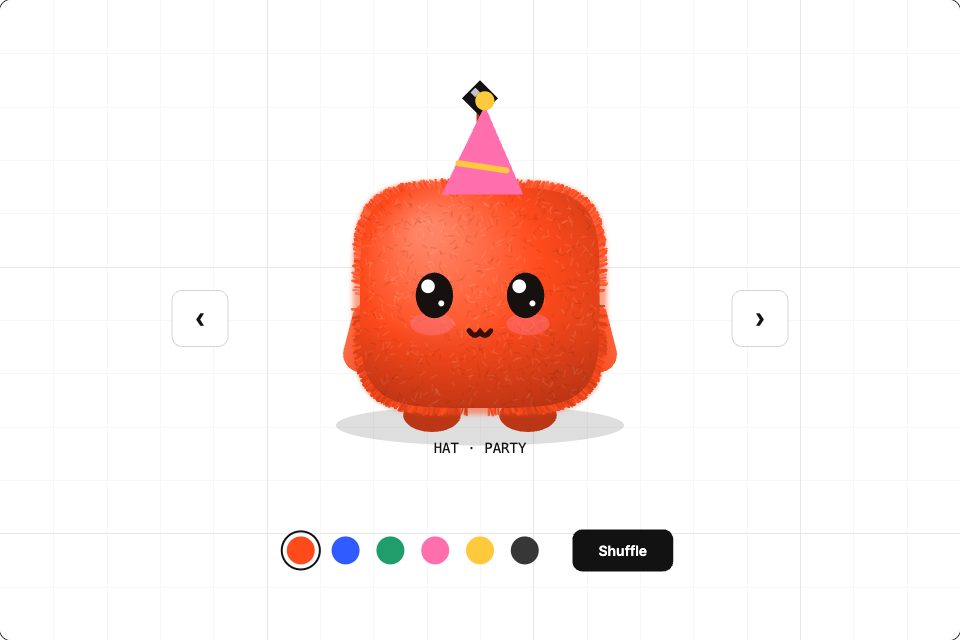
Pick a colour, size or option and see the product change.
Feature walkthroughs
Multi-step flows with swipe, long press and screen transitions for usability tests.
Data-driven screens
Charts and lists bound to inputs, so you test with realistic numbers.
Handoff files
Developers read the inputs and events from the file instead of a spec document.
Drive it from your code
These are the real inputs and events of the demo above. Your app sets the inputs; the file decides how each change looks.
| Name | Type | What it does |
|---|---|---|
outcome | Text | How the payment ends: success or error. Set it from your payment API. |
amount | Text | The price shown on the button. |
accent | Text | The button colour, as a hex value. |
state | Event | Fires on every state change. |
import { ExodeUICanvas } from 'exodeui';

// The file the designer tested, now fed by your payment result.
export function PayButton({ plan, lastPayment }) {
  return (
    <div style={{ width: 480, height: 320 }}>
      <ExodeUICanvas
        src="/pay-button.bexode"
        autoPlay
        fit="Layout"
        inputs={{
          amount: plan.price.toFixed(2),
          outcome: lastPayment?.ok === false ? 'error' : 'success'
        }}
        onTrigger={(name) => name === 'state' && track('pay_state')}
      />
    </div>
  );
}
How you build it
- 1Import or draw
Bring frames in from Figma or start on the ExodeUI canvas.
- 2Wire the behaviour
Add states, transitions and conditions in the state machine, and logic nodes for maths.
- 3Test, then hand off
Share a link for testing; developers load the same .exode file with a runtime.
Features for high-fidelity prototypes and handoff
States, transitions and conditions you can see and click through, as in the demo.
Compare, add, branch and read pointer position without writing code.
Bind any property to a variable, so one value can drive many layers.
A free plugin, plus pasting directly from the Figma clipboard.
More live examples

When another tool is the better fit
If you need a click-through of forty screens to test navigation, the prototyping in your design tool is faster to set up. ExodeUI is the better fit for the few components and moments where behaviour, timing and states matter.
Questions
What is interactive prototyping?
It is building a prototype that responds to input the way the real product would, with states, conditions and data, rather than a set of linked static screens.
How is this different from a Figma prototype?
Figma prototypes link frames and support variables. ExodeUI adds state machines, physics and a runtime, so the same file can run inside the shipped app.
Do developers have to rebuild my prototype?
No. They load the .exode file with the runtime for their framework and connect your inputs to their app state, as in the code above.
Can I import my Figma designs?
Yes, with the free Figma plugin or by pasting from the Figma clipboard.
Can I test with real data?
Yes. Inputs accept numbers, text and arrays, and API variables can fetch data from an endpoint.
Do I have to give up Figma?
No. Keep designing layouts in Figma, import them, and use ExodeUI for the parts that need real states, timing and logic.
Is it overkill for simple screens?
Yes. For static screens and click-throughs, a Figma prototype is faster. ExodeUI pays off for components with several states, timing that matters, or logic like the payment flow above.
Related reading
Test the real states before you ship them.
Free to start. Your .exode files are open JSON that you own.
Other use cases: mobile apps, websites, ai coding agents, design systems, games, game ui, character animation, automotive, broadcast & streaming, film & tv, education & science.