Use case · Automotive
Automotive HMI prototyping with real states and inputs.
Updated November 2026
ExodeUI is useful for automotive HMI prototyping, so design reviews test real behaviour instead of watching concept videos. Clusters, controls, charging screens and alerts respond to simulated vehicle data, with inputs standing in for speed, drive mode, battery or a turn signal. The same files can ship in companion apps for iOS, Android and web.
- Reviews you can driveAnyone in the room can set speed, mode or battery.
- Edge cases on demandLow battery at high speed, without a new render.
- Reuse in the companion appThe same file ships on iOS, Android and web.
Free Community plan · Browser, macOS and Windows
 Open in ExodeUIFree
Concept videos nobody can drive
The usual way
- Concepts are shown as videos, so nobody can try a low battery at high speed.
- Each new scenario means another render from the motion designer.
- Engineering rebuilds the motion from the video for the companion app.
With ExodeUI
- Reviewers change speed, mode, battery and signals live.
- Edge cases are tested in the meeting, not after it.
- The same file can ship in the companion app on iOS, Android and web.
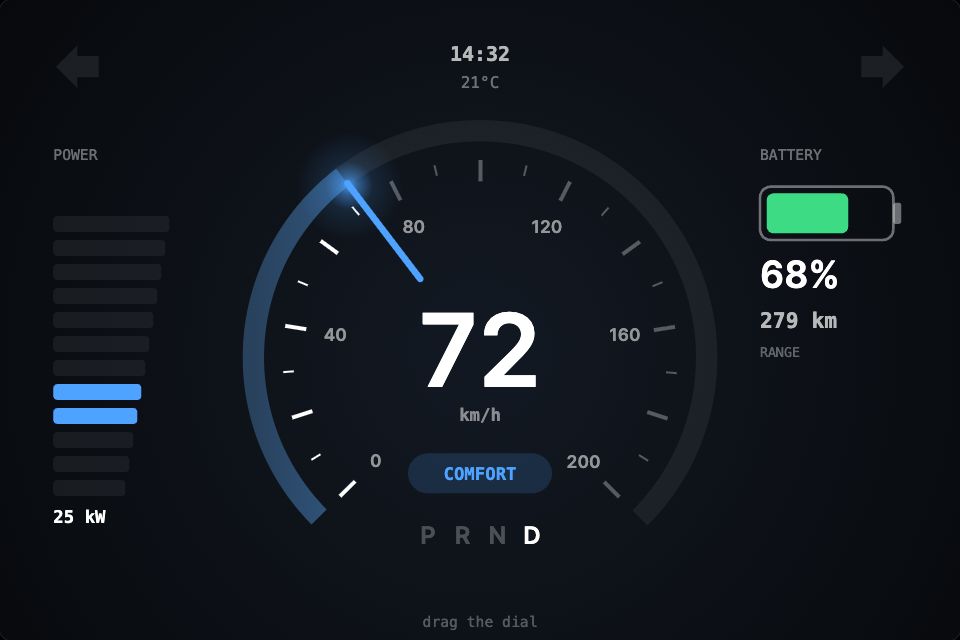
What happens in the demo
In a review, someone plays the car: they set the inputs and everyone watches how the cluster responds. The same inputs can later come from a test rig or a vehicle API.
- The car speeds up
speed: 148The needle swings on a spring, the arc fills and the power bars climb - The driver picks Sport
mode: "sport"The whole cluster fades to red and the power estimate rises - The battery runs low
battery: 15The battery turns amber, then red, and the range shrinks - The driver signals left
signal: "left"The left arrow blinks with a soft glow - A reviewer drags the dial by hand
onInputUpdate: speedThe speed follows the finger and the file reports the new value
Prototype your next cluster concept
Build the gauge, expose speed, mode and battery as inputs, and bring a live link to the review instead of a video.
Free Community plan to start. Professional is $5 a month, billed yearly.
What you can build for in-car UI and HMI concepts
Instrument cluster concepts
Speed, range and power gauges bound to inputs you can scrub, like the demo.
Climate and cabin controls
Dials, sliders and toggles with touch and press feedback.
EV charging screens
Charge level, time remaining and plug states from simulated data.
Alerts and warnings
States for info, caution and warning with clear motion rules.
Companion apps
Lock, climate and charging controls in a Flutter or SwiftUI app.
Showroom and web configurators
Interactive car features on a website or in-store screen.
Drive it from your code
These are the real inputs and events of the demo above. Your app sets the inputs; the file decides how each change looks.
| Name | Type | What it does |
|---|---|---|
speed | Number | Speed in km/h, 0 to 200. Dragging the dial sets it too. |
mode | Text | eco, comfort or sport. Recolours the cluster. |
battery | Number | State of charge, 0 to 100. |
signal | Text | off, left, right or hazard. |
import 'package:exodeui_flutter/exodeui_flutter.dart';

final cluster = ExodeUICanvasController();

// Companion app: feed the cluster from your vehicle API.
Widget buildCluster() => ExodeUICanvas(
      bexodeAsset: 'assets/cluster.bexode',
      controller: cluster,
      fit: ExodeFit.layout,
    );

void onVehicleUpdate(Vehicle v) {
  cluster.setInputNumber('speed', v.speedKmh);
  cluster.setInputNumber('battery', v.chargePercent);
  cluster.setInputText('mode', v.driveMode);
  cluster.setInputText('signal', v.indicator);
}
How you build it
- 1Design the screen
Build the cluster or control panel, or import it from Figma.
- 2Drive it with data
Bind gauges to inputs, or poll an API endpoint that streams test data.
- 3Review and hand over
Share a live link for reviews and pass the file to the app team.
Features for HMI prototypes and vehicle data
Fetch and poll data from an endpoint, with auth types and secret redaction.
Thresholds, comparisons and maths without code.
Bar, line and pie charts and list views bound to data.
Rotate, translate on Z and add perspective for depth.
More live examples
When another tool is the better fit
ExodeUI does not have a C++ or embedded runtime, or a certified runtime for production head units and instrument clusters. Production HMI software should use your platform's approved toolchain. Use ExodeUI for concepts, user testing, design reviews, companion apps and web experiences.
Questions
What is automotive HMI prototyping?
It is building working models of in-car interfaces, such as clusters, infotainment and controls, to test layout, motion and behaviour before production software is written.
Can ExodeUI run on a car's head unit?
Not as production software. ExodeUI has no C++ or certified embedded runtime. Use it for prototypes and reviews, and for companion apps on iOS, Android and web.
Can prototypes use live vehicle data?
They can read data from an API endpoint you provide, with polling, or from inputs set by test code, as in the Flutter code above.
Can I use it for an EV companion app?
Yes. Load the files in Flutter, SwiftUI or React Native and set inputs from the app's vehicle data.
Is ExodeUI affiliated with any car maker?
No. ExodeUI is an independent tool.
Can we use it next to our production HMI toolchain?
Yes. Use ExodeUI for concepts, reviews and companion apps, and keep production head unit software on your platform's approved toolchain.
Can engineers feed it test data?
Yes. Set the inputs from a script or a test rig, or poll an API endpoint with API variables.
Related reading
Bring a concept you can drive to your next review.
Free to start. Your .exode files are open JSON that you own.
Other use cases: mobile apps, websites, product design, ai coding agents, design systems, games, game ui, character animation, broadcast & streaming, film & tv, education & science.