Beyond the Multi-Step Wizard: Onboarding With Checklists and Contextual Help
When a step-by-step wizard is right, why long onboarding tours get skipped, and how checklists and contextual help get people to value faster.
Core Takeaway
Wizards work for occasional, complex tasks where people need to be guided step by step. For product onboarding, a long upfront wizard or tour often gets skipped and does not improve performance. A better default is to let people start using the product immediately, with a short checklist of setup tasks they can finish in any order and help that appears in context when it is needed.
What wizards are good at
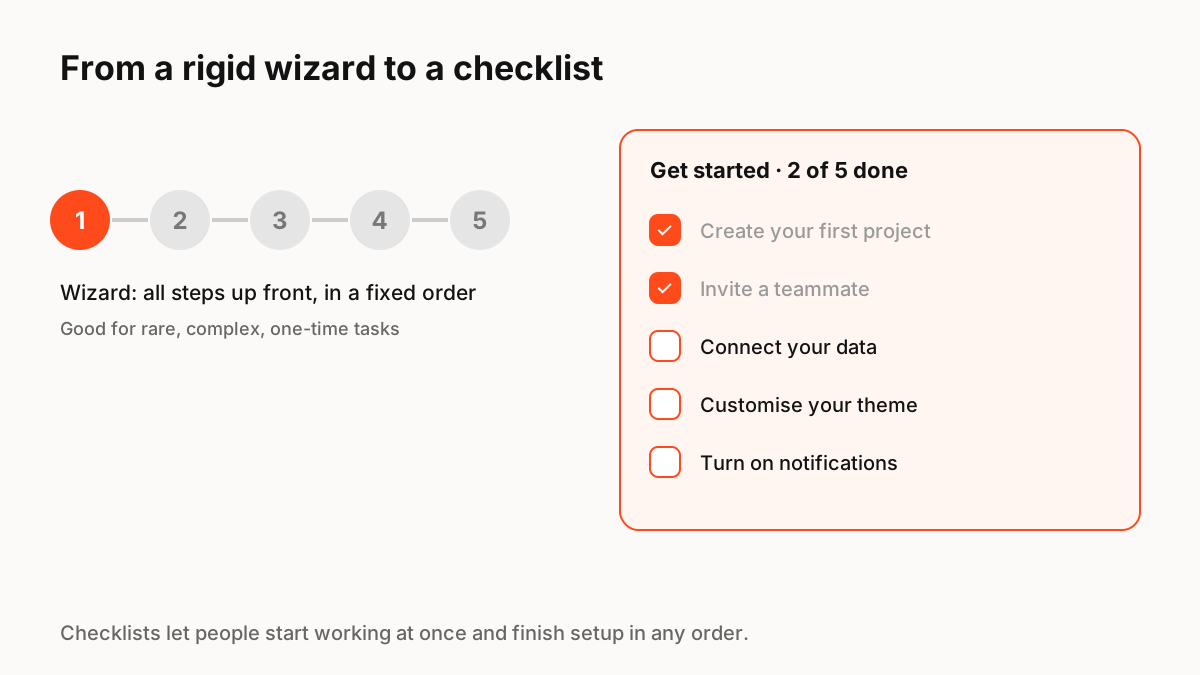
Nielsen Norman Group describes wizards as a pattern that works well for processes performed only occasionally: the system guides the user through steps in order, often with branching behind the scenes. Opening a bank account or setting up tax details are good examples. The trade-off is control: wizards take it away from the user, which experienced users dislike.
Why upfront onboarding often fails
Nielsen Norman Group's analysis of mobile onboarding recommends skipping onboarding whenever possible. Onboarding adds interaction cost even when people skip it, and their research on deck-of-cards tutorials found the tutorials did not improve task performance. Users rarely open a product for no reason, so long promotional tours at first launch tend to be skipped.
The checklist pattern
A checklist lets people start working at once and complete setup tasks in any order, at their own pace. It shows progress, which motivates completion, and it stays available instead of disappearing after one tour.
- Keep it short: three to five tasks that lead to real value.
- Make each item a link that takes people straight to the task.
- Mark items done automatically when people complete them anywhere.
- Let people dismiss it, and bring it back from a menu.
Contextual help instead of tours
Explain a feature when someone reaches it, not before. Good options include helpful empty states, a short hint the first time a control is used, and sample content people can explore and delete. Keep hints dismissible and do not show several at once.
Personality in onboarding
First impressions are where a product's character shows. A small animated character, a satisfying check animation when a task is completed or a friendly empty state can make setup feel lighter, as long as it never blocks the task. Respect reduced-motion settings.
Key Principles to Remember
- Wizards fit occasional, complex, one-time tasks
- Long upfront tours are often skipped and may not improve performance
- Checklists let people start immediately and finish setup in any order
- Explain features in context, when people reach them
- Use personality to lighten setup, never to block it
Frequently Asked Questions
Sources
- Wizards: Definition and Design Recommendations — Nielsen Norman Group
- Mobile-App Onboarding: An Analysis of Components and Techniques — Nielsen Norman Group
- Progressive Disclosure — Nielsen Norman Group