Reducing Checkout and Form Abandonment: What the Research Says
Why people abandon carts and forms, from Baymard's research, and the design fixes that help: fewer fields, guest checkout, clear costs, error handling and feedback.
Core Takeaway
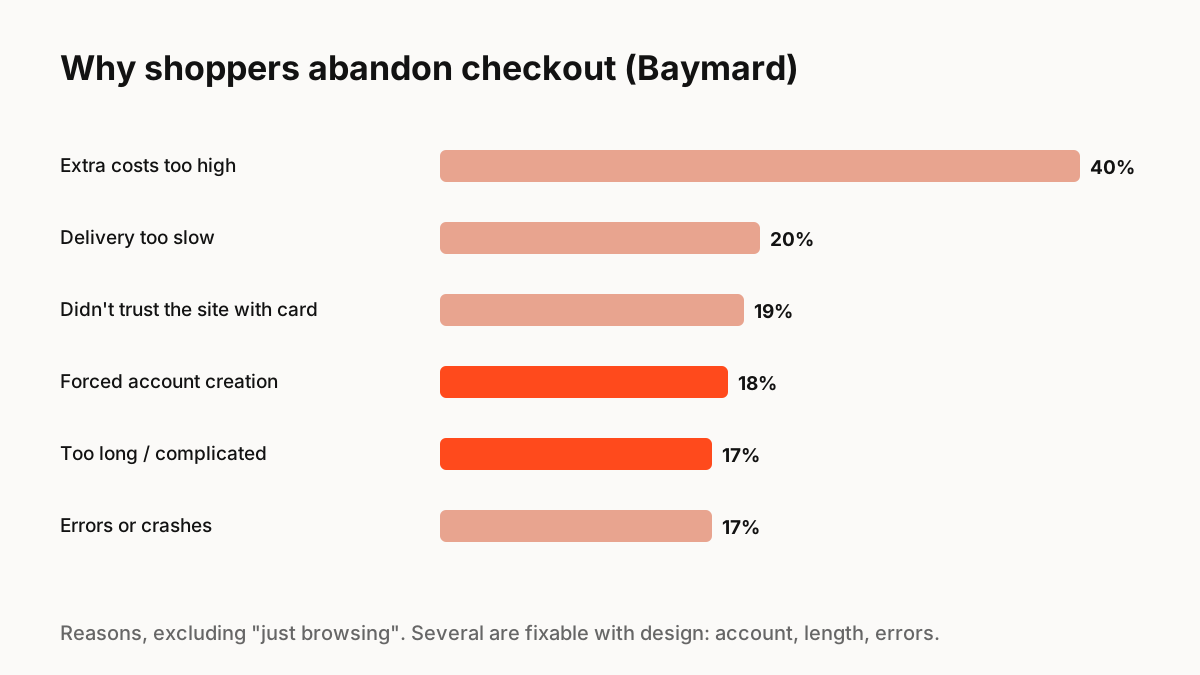
Baymard Institute calculates an average documented cart abandonment rate of about 70%. Many reasons are about price and delivery, but several are design problems: forced account creation, long or complicated checkouts, errors and unclear total costs. Show full costs early, allow guest checkout, cut form fields, and handle errors inline with clear feedback.
The numbers
Baymard Institute averages 50 studies to a documented cart abandonment rate of 70.22%. Many people are just browsing; excluding them, the most common reasons US shoppers gave in Baymard's research include extra costs that were too high (40%), slow delivery (20%), not trusting the site with card details (19%), being asked to create an account (18%), a checkout that was too long or complicated (17%) and site errors or crashes (17%).
Fewer fields
Baymard reports that the average checkout in its benchmark has 5.1 steps and 11.3 form fields, and that the number of fields matters more than the number of steps. Remove optional fields, combine name fields where possible, use address lookup, and hide fields like company name or address line 2 behind a link.
Design fixes for the top reasons
Match each fix to a reason:
- Extra costs: show shipping, tax and fees as early as possible, ideally on the product or cart page.
- Forced account: offer guest checkout, and invite account creation after purchase.
- Too long: fewer fields, sensible defaults, autofill-friendly inputs.
- Errors: inline validation after a field is complete, messages that explain the fix, input kept.
- Trust: recognisable payment options, clear security cues, visible contact and returns information.
Feedback that reassures
Small interactions help people stay confident: a clear loading state on the pay button that prevents double payment, a progress indicator for multi-step checkouts, a visible success state, and a calm, specific error if payment fails. Keep motion short and purposeful; checkout is not the place for decoration.
Key Principles to Remember
- Average documented cart abandonment is about 70% (Baymard)
- Top fixable reasons: forced accounts, long checkouts, errors, hidden costs
- Field count matters more than step count
- Offer guest checkout and show total cost early
- Design the pay button's loading, success and error states
Frequently Asked Questions
Sources
- Cart Abandonment Rate Statistics — Baymard Institute
- Checkout Optimization: 5 Ways to Minimize Form Fields in Checkout — Baymard Institute
- Error-Message Guidelines — Nielsen Norman Group